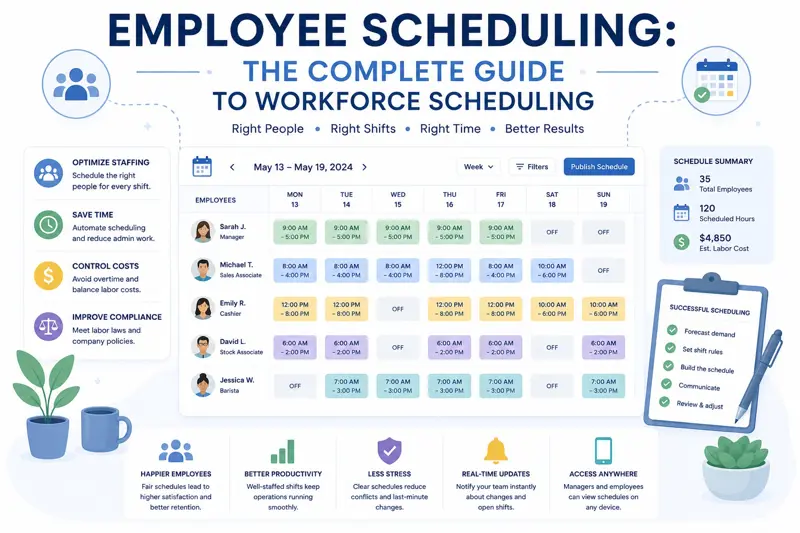
Employee Scheduling: The Complete Guide to Workforce Scheduling
Employee scheduling is one of the most important responsibilities for managers, HR professionals, and business owners. A well-planned schedule ensures that the right employees are available at the right time, workloads are balanced, and business operations continue without unnecessary disruptions.
Poor scheduling can quickly lead to understaffing, excessive overtime, conflicting shifts, employee dissatisfaction, and reduced customer service. Even highly skilled teams struggle when work schedules are inconsistent or planned at the last minute.
Many organizations still rely on spreadsheets, printed schedules, or email chains to organize employee shifts. While these methods may work for small teams, they become increasingly difficult to manage as the workforce grows.
Modern workforce scheduling software allows managers to create schedules, monitor employee availability, approve leave requests, balance workloads, and communicate schedule changes from one centralized platform.
This guide explains the complete employee scheduling process, common mistakes to avoid, and practical strategies for building efficient schedules that benefit both employees and the business.
What Is Employee Scheduling?
Employee scheduling is the process of assigning employees to specific working hours, shifts, projects, or tasks while ensuring that business requirements are met and employee workloads remain balanced.
An effective schedule considers many factors, including employee availability, skills, vacation plans, labor regulations, customer demand, and project priorities.
Scheduling is much more than deciding who works on Monday morning. It requires careful planning that supports productivity while maintaining employee wellbeing.
Why Employee Scheduling Matters
A structured scheduling process benefits every part of an organization. Employees know when they are expected to work, managers gain better visibility into staffing levels, and customers receive consistent service.
Organizations with effective scheduling often experience:
- Higher employee productivity.
- Lower overtime costs.
- Improved customer service.
- Balanced employee workloads.
- Fewer scheduling conflicts.
- Better project planning.
- Higher employee satisfaction.
Well-organized schedules also reduce stress because employees have greater clarity regarding their responsibilities and upcoming work.
Understand Your Staffing Requirements
Before creating any schedule, managers should determine how many employees are required during different periods.
Demand is rarely constant throughout the week. Some businesses experience busy mornings, others have peak afternoon activity, while retail stores often see their highest customer traffic during weekends and holidays.
Questions managers should ask include:
- When are our busiest hours?
- Which departments require additional staff?
- Which employees possess critical skills?
- When are major customer deliveries planned?
- Are there seasonal fluctuations?
- Which projects require additional resources?
Answering these questions before scheduling employees significantly improves resource allocation.
Know Employee Availability
One of the biggest scheduling mistakes is creating work schedules without considering employee availability.
Availability may vary because of:
- Approved vacation.
- Sick leave.
- Training sessions.
- Remote work arrangements.
- Part-time contracts.
- Personal commitments.
Keeping employee availability updated allows managers to build realistic schedules while avoiding unnecessary conflicts.
Assign the Right Employee to the Right Job
Scheduling should consider more than simply filling available shifts. Employees have different experience levels, certifications, and specialized skills.
For example:
- Senior technicians may handle complex installations.
- Certified accountants prepare financial reports.
- Experienced customer support agents resolve escalated cases.
- Project managers coordinate cross-functional teams.
- Developers specialize in different technologies.
Matching employee skills with job requirements improves both productivity and service quality.
Balance Employee Workloads
A common scheduling problem occurs when some employees receive significantly more work than others.
Uneven workload distribution often leads to burnout among high-performing employees while leaving others underutilized.
Managers should regularly review:
- Working hours.
- Overtime.
- Project assignments.
- Task complexity.
- Leave schedules.
- Employee capacity.
Balanced workloads improve productivity while reducing employee turnover.
Create Schedules Early
Publishing schedules only a day or two before employees begin working creates unnecessary stress and confusion.
Whenever possible, schedules should be prepared well in advance.
Early scheduling provides employees with sufficient time to:
- Plan personal commitments.
- Arrange childcare.
- Request schedule adjustments.
- Coordinate transportation.
- Prepare for important projects.
Organizations also benefit because managers have more time to resolve conflicts before schedules become active.
Use a Shared Scheduling Calendar
One of the simplest ways to improve workforce planning is maintaining a shared calendar that everyone can access.
A centralized calendar should display:
- Employee shifts.
- Vacation.
- Remote work.
- Public holidays.
- Training sessions.
- Project milestones.
- Company events.
Instead of asking multiple people who is available next week, managers can review one calendar and make scheduling decisions in seconds.
Example Weekly Schedule
| Employee | Monday | Tuesday | Wednesday | Thursday | Friday |
|---|---|---|---|---|---|
| Emma | 08:00–16:00 | 08:00–16:00 | Vacation | Vacation | 08:00–16:00 |
| Michael | 09:00–17:00 | 09:00–17:00 | 09:00–17:00 | Remote | 09:00–17:00 |
| Sarah | Remote | 08:00–16:00 | 08:00–16:00 | 08:00–16:00 | Training |
A shared scheduling calendar provides managers with an immediate overview of employee availability while helping employees understand upcoming assignments.
If you also manage employee vacations, continue with our guide Employee Leave Management: The Complete Guide .
You may also find Employee Workload Management helpful for balancing schedules and preventing employee burnout.
Understand Different Scheduling Models
Not every organization schedules employees in the same way. The most effective scheduling model depends on the industry, workforce size, operating hours, and business requirements.
Some organizations operate during standard business hours, while others require coverage twenty-four hours a day, seven days a week.
Common scheduling models include:
- Fixed schedules.
- Shift schedules.
- Rotating schedules.
- Flexible schedules.
- Hybrid schedules.
- Project-based schedules.
Choosing the appropriate model improves employee satisfaction while ensuring business continuity.
Shift Scheduling
Shift scheduling is commonly used in healthcare, manufacturing, retail, hospitality, logistics, and customer support organizations.
Instead of working traditional office hours, employees are assigned to specific shifts throughout the day.
Typical shifts include:
- Morning shift.
- Afternoon shift.
- Evening shift.
- Night shift.
Managers must ensure adequate staffing across all shifts while avoiding excessive overtime and employee fatigue.
Rotating Schedules
Rotating schedules distribute less desirable shifts fairly among employees. Instead of assigning the same individuals to evenings or weekends permanently, employees rotate according to a predefined schedule.
Benefits include:
- Fairer workload distribution.
- Reduced employee dissatisfaction.
- Greater scheduling flexibility.
- Improved staffing coverage.
However, rotating schedules require careful planning because frequent schedule changes may affect employee work-life balance.
Flexible Scheduling
Many modern organizations allow employees to choose their working hours within defined limits.
For example, employees may be required to work eight hours per day but can choose whether they start at 07:00, 08:00, or 09:00.
Flexible scheduling often leads to:
- Higher employee satisfaction.
- Improved retention.
- Better work-life balance.
- Increased productivity.
This approach is particularly popular among knowledge workers, software developers, consultants, and professional service teams.
Managing Hybrid and Remote Teams
Hybrid work models have become increasingly common. Managers must now schedule not only working hours but also employee locations.
A modern scheduling system should clearly indicate whether employees are:
- Working in the office.
- Working remotely.
- Travelling.
- Attending training.
- On leave.
Visibility into employee locations improves collaboration while making it easier to organize meetings and allocate resources.
Manage Overtime Carefully
Occasional overtime may be necessary during busy periods, but excessive overtime often creates long-term problems.
Organizations that rely heavily on overtime frequently experience:
- Employee burnout.
- Higher turnover.
- Reduced productivity.
- Increased labor costs.
- More workplace errors.
Managers should monitor overtime trends and identify the root causes rather than treating overtime as a permanent staffing solution.
Resolve Scheduling Conflicts Quickly
Scheduling conflicts occur when multiple employees request the same time off, when staffing levels fall below minimum requirements, or when project demands exceed available resources.
Common conflict scenarios include:
- Vacation overlaps.
- Shift shortages.
- Training conflicts.
- Project deadline conflicts.
- Unexpected absences.
Having clear scheduling policies helps managers resolve these situations consistently and fairly.
Automate Repetitive Scheduling Tasks
Manual schedule creation becomes increasingly difficult as organizations grow. Managers often spend hours each week updating spreadsheets and communicating schedule changes.
Scheduling software can automate many repetitive activities:
- Shift assignments.
- Availability tracking.
- Leave integration.
- Conflict detection.
- Schedule notifications.
- Workload balancing.
Automation reduces administrative effort while improving scheduling accuracy.
Monitor Scheduling Performance
Employee schedules should be reviewed regularly to ensure that staffing plans continue supporting business objectives.
Managers should track key scheduling metrics such as:
| Metric | Purpose |
|---|---|
| Schedule Coverage | Measures staffing adequacy. |
| Overtime Hours | Identifies workload problems. |
| Employee Utilization | Measures productive working time. |
| Absence Rate | Tracks employee availability. |
| Schedule Changes | Measures schedule stability. |
| Shift Fill Rate | Evaluates staffing effectiveness. |
Reviewing these metrics monthly helps managers improve workforce planning and reduce operational inefficiencies.
Common Employee Scheduling Mistakes
- Creating schedules at the last minute.
- Ignoring employee availability.
- Overusing overtime.
- Failing to plan for leave.
- Assigning employees without required skills.
- Ignoring workload balance.
- Making frequent schedule changes.
- Using disconnected spreadsheets.
Avoiding these mistakes helps organizations create more reliable schedules and improve employee satisfaction.
Real-World Example
Consider a company with twenty employees working across customer support, project delivery, and administration.
Before implementing centralized scheduling, managers tracked vacations in one spreadsheet, shifts in another, and project assignments through email.
As a result:
- Employees were occasionally double-booked.
- Vacation conflicts were common.
- Managers spent hours updating schedules.
- Project staffing shortages occurred unexpectedly.
After introducing a centralized scheduling system, managers gained visibility into employee availability, project assignments, and leave requests from a single dashboard.
Within a few months, overtime decreased, scheduling conflicts were reduced, and project planning became significantly easier.
If your organization manages multiple projects simultaneously, continue with our guide Project Management: The Complete Guide .
You may also benefit from reading How to Track Project Progress Effectively , which explains how to monitor project execution and identify delays before they become serious problems.
Plan Workforce Capacity in Advance
Creating weekly schedules is important, but long-term workforce planning is what allows organizations to grow without constantly reacting to staffing problems.
Capacity planning helps managers determine whether enough employees are available to complete upcoming projects, serve customers, and support business growth.
Instead of asking "Who is available tomorrow?", successful organizations ask:
- Will we have enough staff next month?
- Which departments need additional employees?
- When are our busiest seasons?
- Which skills are becoming difficult to replace?
- Do upcoming projects require additional resources?
Planning several weeks or months ahead allows managers to recruit, train, or redistribute employees before staffing shortages become critical.
Forecast Future Staffing Needs
Employee scheduling should not focus only on today's workload. Organizations should also analyze historical data to predict future staffing requirements.
Useful information includes:
- Seasonal demand.
- Customer order trends.
- Project pipelines.
- Vacation periods.
- Public holidays.
- Expected business growth.
Forecasting allows businesses to prepare schedules proactively instead of constantly making last-minute adjustments.
Use Scheduling Reports to Improve Decisions
Scheduling reports provide valuable insight into how efficiently employees are being utilized.
Managers should regularly review reports showing:
- Employee working hours.
- Department utilization.
- Overtime trends.
- Leave balances.
- Shift coverage.
- Schedule conflicts.
These reports help identify recurring problems and support better workforce planning throughout the year.
Improve Communication Around Schedules
Even a perfectly designed schedule loses value if employees are not informed about updates.
Whenever schedules change, employees should receive timely notifications so they can adjust their plans accordingly.
Modern scheduling systems allow managers to:
- Publish schedules instantly.
- Notify employees automatically.
- Record schedule changes.
- Track acknowledgements.
- Share updates with the entire team.
Clear communication reduces confusion while increasing employee accountability.
Integrate Scheduling With Other Business Processes
Employee scheduling becomes far more valuable when integrated with other business functions.
For example, schedules can automatically consider:
- Approved vacation requests.
- Project deadlines.
- Task assignments.
- Employee availability.
- Training sessions.
- Public holidays.
- Remote work days.
Instead of updating multiple spreadsheets, managers can maintain one centralized planning system that keeps all information synchronized.
Employee Scheduling Best Practices
- Create schedules well in advance.
- Consider employee preferences whenever possible.
- Balance workloads fairly.
- Monitor overtime regularly.
- Track employee availability continuously.
- Review schedules weekly.
- Maintain a shared calendar.
- Communicate schedule changes immediately.
- Use scheduling software instead of spreadsheets.
- Analyze scheduling metrics every month.
Employee Scheduling Checklist
- Review employee availability.
- Check approved leave requests.
- Review project deadlines.
- Assign employees based on skills.
- Balance workloads.
- Limit overtime.
- Publish schedules early.
- Verify staffing coverage.
- Resolve scheduling conflicts.
- Notify employees.
- Update the shared calendar.
- Track schedule changes.
- Review employee utilization.
- Analyze overtime reports.
- Monitor department capacity.
- Prepare backup employees.
- Forecast future staffing needs.
- Review scheduling KPIs.
- Collect employee feedback.
- Continuously improve scheduling processes.
Frequently Asked Questions
What is employee scheduling?
Employee scheduling is the process of assigning employees to working hours, shifts, projects, or specific tasks while ensuring adequate staffing and balanced workloads.
Why is employee scheduling important?
Effective scheduling improves productivity, reduces overtime, prevents staffing shortages, and helps employees maintain a healthy work-life balance.
How often should schedules be created?
Most organizations prepare schedules weekly or monthly, although businesses with shift-based operations may update schedules more frequently.
What should managers consider before creating schedules?
Managers should review employee availability, approved leave, project deadlines, required skills, customer demand, and department workloads.
How can companies reduce overtime?
By balancing workloads, improving workforce planning, forecasting staffing requirements, and monitoring employee utilization regularly.
Should employee schedules include remote work?
Yes. Modern scheduling systems should clearly distinguish between office work, remote work, business travel, training, and employee leave.
What software helps with employee scheduling?
Employee scheduling software combines shared calendars, workload management, vacation tracking, project planning, task management, reporting, and employee availability into a centralized platform.
Related Articles
- Employee Leave Management: The Complete Guide
- Employee Workload Management
- Project Management: The Complete Guide
- Project Planning Step by Step
- How to Track Project Progress Effectively
- Time Management: The Complete Guide
- Task Management: The Complete Guide
Final Thoughts
Employee scheduling is much more than filling shifts on a calendar. It is a strategic process that directly affects productivity, employee satisfaction, customer service, and overall business performance.
Organizations that invest in structured scheduling practices reduce administrative work, improve communication, minimize overtime, and ensure the right people are available when they are needed most.
As businesses grow, manual scheduling with spreadsheets becomes increasingly difficult. Centralizing schedules, employee availability, leave management, project assignments, and workload planning in one system provides managers with better visibility and allows faster, more informed decisions.
MyPlannerDesk simplifies workforce scheduling by combining employee calendars, project planning, task management, vacation tracking, workload balancing, reminders, dashboards, and reporting in one integrated platform. Managers can create schedules in minutes, instantly see employee availability, detect conflicts before they become problems, and keep the entire team aligned through a shared workspace.
Whether your organization has a small office team or hundreds of employees working across multiple departments, implementing an organized employee scheduling process will improve operational efficiency, reduce stress, and help your business deliver consistent results every day.