Employee Scheduling: The Complete Guide to Planning Work Schedules Efficiently
Creating an effective employee schedule is one of the most important responsibilities of any manager. A well-planned schedule ensures that every shift is properly staffed, projects stay on track, customer demands are met, and employees maintain a healthy work-life balance.
Unfortunately, scheduling is rarely as simple as filling empty time slots on a calendar. Managers must consider employee availability, vacations, workload, skills, labor regulations, project priorities, and unexpected absences—all while keeping productivity high and controlling labor costs.
Many businesses still rely on spreadsheets, handwritten schedules, or endless email chains to organize employee shifts. While these methods may work for very small teams, they quickly become inefficient as organizations grow.
Modern scheduling software simplifies this entire process by providing real-time visibility into employee availability, project assignments, and team capacity.
In this guide, you'll learn how to build effective employee schedules, avoid common planning mistakes, improve workforce utilization, and keep your team organized throughout the year.
What Is Employee Scheduling?
Employee scheduling is the process of assigning employees to specific working hours, shifts, projects, or tasks while balancing business requirements and employee availability.
Effective scheduling ensures that:
- The right employees are available at the right time.
- Projects receive sufficient staffing.
- Customer demand is covered.
- Employees receive fair workloads.
- Overtime is minimized.
- Vacation requests are respected whenever possible.
Good scheduling benefits both employers and employees by creating predictable work patterns while maximizing productivity.
Why Employee Scheduling Is So Important
Poor scheduling affects nearly every aspect of a business.
When too few employees are available, customers experience delays, projects fall behind schedule, and existing staff become overloaded.
On the other hand, scheduling too many employees during quiet periods increases labor costs without improving productivity.
A balanced schedule helps organizations:
- Improve customer service.
- Reduce overtime expenses.
- Increase employee satisfaction.
- Avoid staffing shortages.
- Improve project delivery.
- Balance workloads fairly.
- Support long-term planning.
Ultimately, scheduling is about placing the right people in the right roles at the right time.
Know Your Team Before Building the Schedule
Before creating any work schedule, managers should understand the capabilities and availability of every employee.
Important information includes:
- Working hours.
- Employment type (full-time or part-time).
- Skills and certifications.
- Vacation plans.
- Public holidays.
- Training sessions.
- Project assignments.
- Maximum weekly working hours.
Without this information, scheduling becomes guesswork rather than planning.
Start With Business Requirements
Every schedule should begin by identifying business needs rather than employee preferences alone.
Ask questions such as:
- How many employees are required each day?
- Which departments require additional staffing?
- Are there upcoming project deadlines?
- Will customer demand increase?
- Are special skills required?
Once business requirements are clear, managers can begin assigning employees based on availability and expertise.
Consider Employee Availability
Employee availability is one of the biggest scheduling constraints.
Before assigning shifts, managers should review:
- Approved vacations.
- Public holidays.
- Sick leave.
- Training days.
- Remote work schedules.
- Flexible working arrangements.
Ignoring availability often results in last-minute schedule changes that create additional work for both managers and employees.
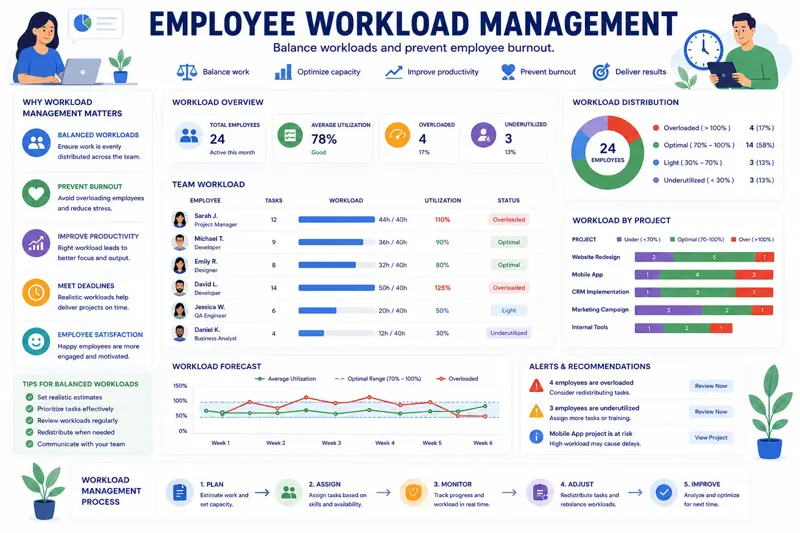
Balance Workloads Fairly
Scheduling is not simply about filling shifts—it is about distributing work fairly across the team.
Some employees naturally receive more assignments because they are experienced or highly reliable. While this may seem efficient in the short term, it often leads to burnout.
Managers should regularly compare workloads to ensure:
- No employee is consistently overloaded.
- Skills are distributed appropriately.
- Training opportunities are shared.
- Overtime is minimized.
Balanced workloads improve morale while reducing employee turnover.
Example Weekly Schedule
| Employee | Mon | Tue | Wed | Thu | Fri |
|---|---|---|---|---|---|
| Emma | Project A | Project A | Project B | Project B | Vacation |
| David | Project C | Project C | Project C | Project A | Project A |
| Sarah | Training | Project B | Project B | Project C | Project C |
| Michael | Project A | Remote Work | Project A | Project A | Project B |
A visual schedule like this allows managers to identify staffing conflicts before they affect project delivery.
Review the Schedule Before Publishing
Before sharing the final schedule with employees, verify that:
- Every shift is covered.
- No employee exceeds maximum working hours.
- Vacation requests have been considered.
- Critical projects have enough resources.
- Specialized skills are available when required.
A few minutes spent reviewing the schedule can prevent hours of adjustments later.
If your team also struggles with balancing workloads, continue with our guide Employee Workload Management: How to Prevent Burnout and Improve Productivity .
You'll also benefit from reading Project Planning Step by Step: A Complete Guide for Successful Teams , which explains how employee scheduling fits into overall project planning.
Plan Schedules Several Weeks in Advance
One of the biggest scheduling mistakes is creating work schedules only a day or two before they take effect. Last-minute planning leaves little room for adjustments and often results in unnecessary overtime, staffing shortages, or employee frustration.
Whenever possible, schedules should be prepared at least two to four weeks in advance. This gives managers enough time to review vacation requests, resolve conflicts, and communicate changes before employees make personal commitments.
Advance planning also improves project coordination because team leaders know exactly which employees will be available during each project phase.
Plan Around Employee Skills
Every employee brings different knowledge and experience to the organization. Scheduling should therefore consider more than simple availability.
For example, assigning three junior technicians to a complex installation without an experienced supervisor could delay the entire project.
Likewise, assigning every critical task to the same senior employee eventually creates overload and increases the risk of burnout.
When building schedules, consider:
- Technical certifications.
- Years of experience.
- Customer knowledge.
- Leadership responsibilities.
- Language skills.
- Special equipment qualifications.
Matching employee skills with project requirements improves both productivity and work quality.
Prepare for Unexpected Absences
Even the most carefully planned schedule will occasionally be disrupted by unexpected events.
Employees may become ill, experience family emergencies, or need urgent time off. Rather than reacting in panic, successful organizations prepare backup plans in advance.
Good contingency planning includes:
- Cross-training employees.
- Maintaining backup staff.
- Documenting important procedures.
- Keeping project information accessible.
- Identifying replacement employees for key roles.
Preparation minimizes disruption and keeps projects moving forward even when unexpected absences occur.
Reduce Overtime Through Better Scheduling
Occasional overtime is unavoidable, especially during critical project phases. However, consistently relying on overtime usually indicates planning problems rather than employee dedication.
Excessive overtime often leads to:
- Lower productivity.
- More mistakes.
- Higher employee turnover.
- Reduced morale.
- Increased labor costs.
Managers should regularly monitor overtime hours and investigate the underlying causes rather than treating overtime as a normal operating practice.
Use Color-Coded Calendars
Visual schedules make workforce planning much easier than long spreadsheets. Color coding allows managers to understand the schedule at a glance.
For example:
| Color | Meaning |
|---|---|
| Green | Available for assignment |
| Blue | Assigned to project |
| Yellow | Training or meeting |
| Orange | Remote work |
| Red | Vacation or leave |
Visual planning reduces scheduling mistakes and allows managers to identify staffing gaps within seconds.
Example: Solving a Scheduling Conflict
Imagine that three employees request vacation during the same week while an important customer implementation is scheduled.
Without advance planning, the manager may have to deny leave requests or delay the project.
Instead, an organized scheduling process might include:
- Approving vacations months in advance.
- Redistributing project tasks.
- Assigning backup employees.
- Moving lower-priority work.
- Hiring temporary staff if necessary.
Because the conflict was identified early, both employee satisfaction and project deadlines can be maintained.
Monitor Schedule Performance
Creating the schedule is only the beginning. Managers should regularly evaluate whether the schedule is actually supporting business goals.
Useful performance indicators include:
- Overtime hours.
- Employee utilization.
- Missed shifts.
- Project delays.
- Schedule changes.
- Customer complaints.
- Employee satisfaction.
Reviewing these metrics each month helps managers continuously improve the planning process.
Common Employee Scheduling Mistakes
- Publishing schedules too late.
- Ignoring employee availability.
- Assigning too much overtime.
- Scheduling employees without required skills.
- Not planning for vacations.
- Failing to prepare backup staff.
- Ignoring workload balance.
- Using outdated spreadsheets.
Avoiding these common mistakes leads to smoother operations, happier employees, and more predictable project delivery.
If you're still managing schedules with spreadsheets, you may also enjoy our comparison Planner vs Excel – Which Is Better?, which explains why modern planning software saves time and reduces scheduling errors.
To improve daily task coordination after schedules are created, read How to Organize Employees' Workday .
Manage Hybrid and Remote Work Schedules
The rise of hybrid and remote work has introduced new scheduling challenges. Managers are no longer responsible only for assigning shifts—they must also coordinate where employees work and ensure that collaboration remains effective.
A modern employee schedule should clearly indicate whether employees are:
- Working from the office.
- Working remotely.
- Visiting customers.
- Attending training sessions.
- On vacation.
- Unavailable due to leave.
Having this information visible in one centralized calendar prevents confusion and improves communication across the entire organization.
Create Fair Rotating Schedules
Businesses that operate evenings, weekends, or multiple shifts should ensure that schedules remain fair for every employee.
Rotating unpopular shifts among the team helps improve morale and reduces employee dissatisfaction.
When building rotating schedules, managers should consider:
- Previous shift assignments.
- Employee preferences.
- Legal working-hour limits.
- Required rest periods.
- Business demand.
Fair scheduling creates a healthier workplace while reducing turnover.
Use Automation Whenever Possible
Manual scheduling becomes increasingly difficult as organizations grow. Modern workforce management software automates many repetitive planning tasks, saving managers valuable time.
Automation can assist with:
- Detecting scheduling conflicts.
- Calculating available capacity.
- Monitoring overtime.
- Tracking vacation balances.
- Suggesting available employees.
- Generating recurring schedules.
Rather than replacing managers, automation supports better decision-making by providing accurate, up-to-date information.
Keep Employees Informed
Even the best schedule has little value if employees are unaware of changes.
Managers should communicate schedule updates promptly and consistently. Employees should know:
- When their schedule changes.
- Which projects they are assigned to.
- Upcoming meetings.
- Vacation approvals.
- Training sessions.
- Important project deadlines.
Transparent communication reduces misunderstandings and improves accountability.
Weekly Employee Scheduling Checklist
Use this checklist before publishing each week's schedule:
- Review employee availability.
- Check approved vacations.
- Confirm project priorities.
- Verify staffing requirements.
- Balance workloads.
- Monitor overtime hours.
- Assign backup employees.
- Review remote work plans.
- Confirm required skills for every project.
- Publish the schedule early.
Key Metrics for Employee Scheduling
Monitoring scheduling performance helps managers identify opportunities for continuous improvement.
| Metric | Purpose |
|---|---|
| Employee utilization | Measures how effectively available working time is used. |
| Overtime hours | Identifies excessive workloads. |
| Schedule changes | Shows planning stability. |
| Vacation conflicts | Measures planning efficiency. |
| Missed deadlines | Evaluates schedule quality. |
| Employee satisfaction | Measures schedule fairness. |
Regularly reviewing these indicators helps organizations improve scheduling accuracy while maintaining employee wellbeing.
Related Articles
Continue improving your planning and workforce management skills with these guides:
- Employee Workload Management
- Project Planning Step by Step
- How to Prioritize Tasks Effectively
- How to Organize Employees' Workday
- How to Track Project Progress Effectively
- Planner vs Excel – Which Is Better?
Frequently Asked Questions
What is employee scheduling?
Employee scheduling is the process of assigning employees to working hours, projects, shifts, or tasks while balancing business needs and employee availability.
How far in advance should work schedules be published?
Most organizations benefit from publishing schedules at least two to four weeks in advance, allowing employees to plan their personal commitments.
Why is balanced scheduling important?
Balanced schedules improve productivity, reduce overtime, prevent burnout, and increase employee satisfaction.
How can managers reduce scheduling conflicts?
By tracking vacations, employee availability, skills, and project priorities in one centralized planning system, managers can identify conflicts before publishing schedules.
Should employee preferences be considered?
Yes. While business requirements remain the priority, considering employee preferences improves morale and helps retain talented staff.
How do remote employees affect scheduling?
Remote work requires additional planning to ensure availability, collaboration, meeting participation, and project coordination remain effective.
What software helps with employee scheduling?
Employee scheduling software combines calendars, project assignments, workload management, vacation tracking, reporting, and resource planning into a single platform.
Can scheduling software benefit small businesses?
Absolutely. Even small teams save significant time by replacing spreadsheets with centralized scheduling tools that improve visibility and reduce planning errors.
Final Thoughts
Effective employee scheduling is much more than filling time slots on a calendar. It requires balancing business priorities, employee wellbeing, available resources, project deadlines, and long-term planning.
Organizations that invest in structured scheduling experience fewer staffing conflicts, reduced overtime, improved customer service, and more successful projects.
MyPlannerDesk simplifies employee scheduling by bringing together calendars, task management, project planning, vacation tracking, employee availability, workload management, and reporting in one centralized workspace. Managers always know who is available, who is overloaded, and how resources are distributed across projects, making scheduling faster, easier, and significantly more accurate.
Whether you manage five employees or five hundred, a well-planned schedule is one of the most effective ways to improve productivity, strengthen teamwork, and deliver better business results.