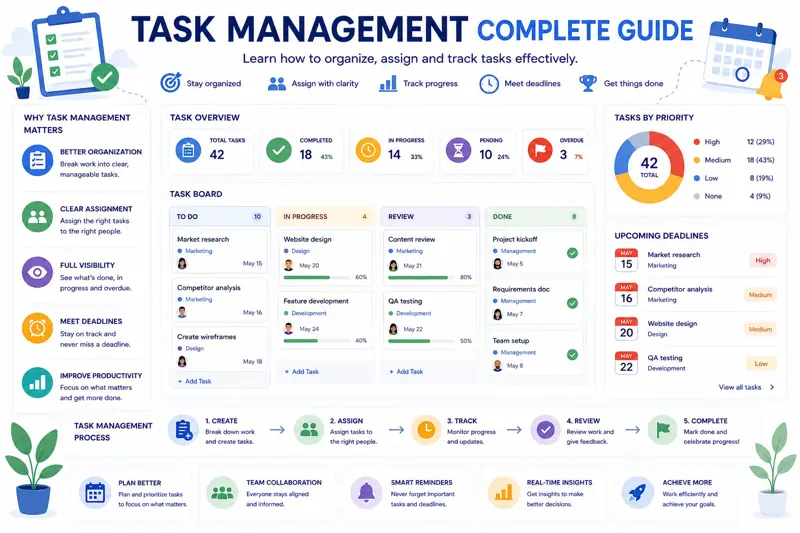
Task Management: The Complete Guide to Organizing Work Effectively
Every successful project is built on hundreds of well-managed tasks. Whether you manage a small business, lead a project team, or simply organize your own daily responsibilities, effective task management helps ensure that work is completed on time, priorities remain clear, and important deadlines are never missed.
Unfortunately, many organizations still rely on sticky notes, spreadsheets, email chains, or memory to keep track of work. As projects grow and teams become larger, these methods quickly become difficult to manage.
Employees spend valuable time searching for information, asking colleagues for updates, or trying to determine who is responsible for completing specific tasks. Instead of focusing on productive work, teams become overwhelmed by administration and unnecessary communication.
A structured task management system solves these problems by providing a single place where every task, deadline, priority, and responsibility is clearly defined.
In this comprehensive guide, you'll learn how professional teams organize their work, assign responsibilities, prioritize tasks, monitor progress, and continuously improve productivity using proven task management practices.
What Is Task Management?
Task management is the process of creating, organizing, assigning, tracking, and completing work activities throughout their entire lifecycle.
A task can be something simple, such as replying to a customer email, or something much larger, such as designing an entire software module. Regardless of complexity, every task should include enough information for the responsible person to complete it successfully.
A well-defined task normally includes:
- Task title.
- Description.
- Responsible employee.
- Priority level.
- Due date.
- Status.
- Related project.
- Attachments or documentation.
When every task contains this information, collaboration becomes significantly more efficient because everyone understands exactly what needs to be done.
Why Task Management Matters
Organizations rarely fail because employees are unwilling to work. More often, projects struggle because work is poorly organized.
Without an effective task management process, teams experience:
- Missed deadlines.
- Duplicate work.
- Conflicting priorities.
- Poor communication.
- Lost information.
- Employee frustration.
- Project delays.
An organized task management system creates clarity, improves accountability, and helps employees focus on meaningful work instead of constantly searching for information.
The Task Lifecycle
Every task follows a lifecycle from creation to completion. Understanding this process helps managers build consistent workflows.
| Stage | Description |
|---|---|
| Create | Define the task and expected outcome. |
| Assign | Select the responsible employee. |
| Plan | Set priorities and deadlines. |
| Execute | Perform the work. |
| Review | Verify quality and completion. |
| Close | Mark the task as completed. |
Following a consistent lifecycle helps ensure that no important work is forgotten or left unfinished.
Start With Clear Task Descriptions
One of the most common causes of project delays is assigning vague or incomplete tasks.
For example, creating a task called "Website Update" provides very little guidance.
A better task description would be:
Update the company homepage with the new product announcement, replace the banner image, update pricing information, and publish all changes before Friday at 4:00 PM.
Specific instructions reduce misunderstandings while minimizing unnecessary questions.
Assign One Owner for Every Task
Although multiple employees may collaborate on the same activity, every task should have one clearly identified owner.
Without clear ownership, team members often assume someone else is responsible, causing unnecessary delays.
The task owner should:
- Monitor progress.
- Coordinate with other team members.
- Update task status.
- Report potential delays.
- Confirm completion.
Clear ownership greatly improves accountability throughout the project.
Prioritize Tasks Correctly
Not every task deserves the same level of attention.
Some activities directly affect customers or project deadlines, while others can safely wait until more urgent work has been completed.
Many organizations classify priorities using four levels:
| Priority | Meaning |
|---|---|
| Critical | Requires immediate attention. |
| High | Important work with near-term deadlines. |
| Medium | Normal project activities. |
| Low | Can be completed when time permits. |
Consistent prioritization helps employees focus on work that creates the greatest business value.
Break Large Tasks Into Smaller Activities
Large tasks often remain unfinished because they appear overwhelming. Breaking complex work into smaller activities makes projects easier to manage and progress easier to measure.
For example, instead of creating one task called:
Create Company Website
Break it into:
- Create wireframes.
- Design homepage.
- Develop backend.
- Create product pages.
- Write content.
- Test functionality.
- Deploy website.
Smaller tasks provide better visibility while allowing managers to identify delays much earlier.
Monitor Task Status Continuously
Simply assigning tasks is not enough. Managers should regularly review progress to ensure projects continue moving forward.
Most organizations use status values such as:
- Not Started.
- In Progress.
- Waiting for Review.
- Blocked.
- Completed.
Updating task status regularly gives everyone a clear picture of project progress without requiring constant meetings.
Example Task Board
| Task | Owner | Priority | Status |
|---|---|---|---|
| Create Landing Page | Emma | High | In Progress |
| Write User Guide | David | Medium | Not Started |
| Database Migration | Michael | Critical | Blocked |
| Customer Testing | Sarah | High | Review |
A visual task board makes it easy to identify overdue work, blocked tasks, and potential bottlenecks before they impact project delivery.
If you're looking for better ways to prioritize work, continue with our guide How to Prioritize Tasks Effectively Using the Eisenhower Matrix .
You'll also benefit from reading Project Planning Step by Step , which explains how well-organized tasks fit into successful project planning.
Organize Tasks by Project
As organizations grow, the number of daily tasks increases rapidly. Without proper organization, employees waste valuable time searching for information or trying to understand which activities belong to which project.
Grouping tasks by project keeps work organized and provides better visibility for managers and team members alike.
Each project should contain:
- Project objectives.
- Related tasks.
- Assigned employees.
- Deadlines.
- Files and documentation.
- Project milestones.
This structure allows everyone involved to understand how individual tasks contribute to the project's overall success.
Manage Task Dependencies
Many tasks cannot begin until another task has been completed. These relationships are called task dependencies.
Ignoring dependencies often creates unrealistic schedules and unnecessary project delays.
For example:
| Task | Depends On |
|---|---|
| Create Database | Requirements Approved |
| Develop API | Database Complete |
| Frontend Development | UI Design Approved |
| User Testing | Development Finished |
| Production Release | Testing Completed |
Tracking dependencies helps managers identify which delayed tasks will affect the overall project timeline.
Set Realistic Deadlines
Deadlines motivate employees, but unrealistic deadlines create unnecessary pressure and reduce work quality.
Before assigning due dates, managers should consider:
- Task complexity.
- Employee availability.
- Current workload.
- Task dependencies.
- Required approvals.
- Potential risks.
Adding small time buffers for unexpected issues often prevents projects from falling behind schedule.
Track Progress Every Week
Task management is an ongoing process rather than a one-time activity. Successful managers regularly review task progress and adjust priorities when necessary.
A weekly review might include:
- Completed tasks.
- Overdue tasks.
- Blocked tasks.
- Upcoming deadlines.
- Employee workload.
- Project risks.
Weekly reviews help teams solve problems while they are still small.
Handle Blocked Tasks Quickly
Blocked tasks prevent projects from moving forward. The longer they remain blocked, the greater the impact on schedules and productivity.
Common reasons include:
- Waiting for customer approval.
- Missing information.
- Unavailable resources.
- Technical issues.
- Budget approval.
- Dependency on another task.
Managers should review blocked tasks during every project meeting and remove obstacles as quickly as possible.
Improve Team Collaboration
Task management is not only about assigning work—it is also about helping teams collaborate effectively.
Modern task management systems allow employees to:
- Comment on tasks.
- Attach documents.
- Share updates.
- Notify teammates.
- Track changes.
- View complete task history.
Keeping all communication inside the task eliminates long email chains and ensures that important information is never lost.
Avoid Multitasking
Many managers believe employees become more productive by working on several tasks simultaneously. Research and practical experience often show the opposite.
Constantly switching between tasks increases mistakes and reduces focus.
Instead, encourage employees to complete high-priority work before moving to the next assignment.
Focused work usually produces better quality in less time.
Measure Task Management Performance
To improve your task management process, monitor key performance indicators (KPIs) regularly.
| Metric | Purpose |
|---|---|
| Tasks completed on time | Measures planning accuracy. |
| Average task duration | Tracks productivity. |
| Blocked tasks | Identifies workflow issues. |
| Overdue tasks | Measures scheduling performance. |
| Task completion rate | Shows team efficiency. |
| Reopened tasks | Indicates quality problems. |
Reviewing these metrics monthly helps managers identify opportunities for continuous improvement.
Common Task Management Mistakes
- Assigning tasks without clear descriptions.
- Giving one task multiple owners.
- Ignoring task priorities.
- Setting unrealistic deadlines.
- Not tracking progress regularly.
- Failing to update task status.
- Ignoring blocked tasks.
- Managing work only through email.
Avoiding these mistakes makes task management more predictable and improves overall project performance.
If your projects frequently experience delays, continue with our guide How to Reduce Project Delays .
You may also find our article How to Track Project Progress Effectively helpful for monitoring ongoing work and identifying potential issues before they affect project delivery.
Use Kanban Boards to Visualize Work
One of the simplest ways to improve task management is to visualize work using a Kanban board. Instead of reading long task lists, team members can instantly see the current status of every activity.
A typical Kanban board contains columns such as:
- Backlog
- To Do
- In Progress
- Waiting for Review
- Completed
As work progresses, tasks move from one column to the next. This visual workflow helps managers identify bottlenecks before they begin affecting project deadlines.
Kanban boards are especially useful for software development, marketing teams, customer support, and internal business projects where priorities frequently change.
Automate Repetitive Tasks
Many routine activities do not require manual effort. Modern task management software can automate repetitive processes, allowing employees to spend more time on valuable work.
Examples of automation include:
- Automatically assigning recurring tasks.
- Sending deadline reminders.
- Creating weekly reports.
- Updating task status after approval.
- Notifying managers when deadlines are missed.
- Generating recurring maintenance schedules.
Automation reduces administrative work while improving consistency across the organization.
Create Recurring Tasks
Many business activities occur on a regular schedule. Rather than creating these tasks manually every week or month, recurring tasks ensure they are generated automatically.
Typical recurring tasks include:
- Weekly team meetings.
- Monthly financial reports.
- Quarterly performance reviews.
- Equipment maintenance.
- Data backups.
- Security audits.
Recurring tasks help organizations standardize routine work and ensure that important responsibilities are never forgotten.
Use Notifications and Reminders Wisely
Notifications keep employees informed, but too many alerts quickly become background noise.
Instead of notifying employees about every minor update, focus on meaningful events such as:
- New task assignments.
- Upcoming deadlines.
- Task comments.
- Status changes.
- Approval requests.
- Overdue tasks.
Relevant notifications improve responsiveness without overwhelming the team.
Personal Task Management vs Team Task Management
Although personal productivity is important, organizations also need visibility into team activities.
Personal task management focuses on:
- Daily to-do lists.
- Personal reminders.
- Individual priorities.
- Time management.
Team task management adds:
- Shared projects.
- Collaboration.
- Resource planning.
- Workload balancing.
- Progress reporting.
- Manager oversight.
Combining both approaches creates an organized and transparent work environment.
Daily Task Management Workflow
Many high-performing teams follow a consistent daily workflow.
- Review today's priorities.
- Check overdue tasks.
- Update task status.
- Complete high-priority work first.
- Resolve blocked tasks.
- Communicate important updates.
- Review progress before finishing the day.
Following a structured daily routine helps employees stay focused while giving managers real-time visibility into project progress.
Task Management Best Practices Checklist
- Create clear task descriptions.
- Assign one owner per task.
- Set realistic deadlines.
- Define task priorities.
- Track dependencies.
- Update task status regularly.
- Review progress weekly.
- Monitor blocked tasks.
- Use recurring tasks where appropriate.
- Automate repetitive processes.
- Attach relevant documents.
- Keep communication inside the task.
- Balance workloads.
- Review overdue tasks daily.
- Measure task completion rates.
- Limit multitasking.
- Encourage accountability.
- Analyze performance metrics.
- Improve workflows continuously.
- Celebrate completed milestones.
Why Choose MyPlannerDesk?
Managing tasks with spreadsheets and email becomes increasingly difficult as teams grow. MyPlannerDesk combines task management, project planning, employee scheduling, calendars, workload management, vacation tracking, dashboards, and reporting in one easy-to-use platform. By keeping everything in a single place, teams spend less time searching for information and more time completing important work.
Whether you manage a small business or a large organization, MyPlannerDesk helps you stay organized, improve collaboration, and deliver projects on time.
Related Articles
Continue improving your productivity with these practical guides:
- Project Planning Step by Step
- How to Prioritize Tasks Effectively
- How to Track Project Progress Effectively
- Employee Workload Management
- Employee Scheduling: The Complete Guide
- Planner vs Excel – Which Is Better?
Frequently Asked Questions
What is task management?
Task management is the process of organizing, assigning, prioritizing, tracking, and completing work efficiently throughout a project's lifecycle.
Why is task management important?
Effective task management improves productivity, increases accountability, reduces missed deadlines, and helps teams collaborate more efficiently.
What should every task include?
Every task should include a clear title, description, responsible employee, priority, due date, status, and any relevant files or documentation.
What is the difference between task management and project management?
Task management focuses on individual work items, while project management coordinates multiple related tasks, resources, timelines, budgets, and overall project objectives.
How often should task status be updated?
Task status should be updated whenever meaningful progress occurs so managers and team members always have accurate information.
What is a Kanban board?
A Kanban board is a visual workflow that organizes tasks into columns based on their current status, making progress easy to monitor.
Can small businesses benefit from task management software?
Absolutely. Even small teams improve communication, reduce missed work, and save time by organizing tasks in a centralized system.
What software is best for managing business tasks?
The best task management software combines task organization, project management, calendars, workload planning, reporting, document sharing, and team collaboration in one platform.
Final Thoughts
Effective task management is the foundation of every successful organization. When employees clearly understand what needs to be done, who is responsible, and when work should be completed, projects become more predictable and teams become significantly more productive.
By organizing work, setting priorities, tracking progress, and continuously improving workflows, organizations can reduce delays, improve communication, and consistently deliver high-quality results.
MyPlannerDesk provides everything needed to manage tasks in one centralized workspace. From task assignments and project planning to calendars, employee scheduling, workload management, progress tracking, and reporting, teams always have a clear view of what needs to be done next. Instead of managing work through spreadsheets and email chains, organizations can simplify their daily operations and improve collaboration with a modern task management platform.
Whether you're managing a startup, a growing business, or a large organization, investing in structured task management is one of the most effective ways to increase productivity, improve teamwork, and deliver successful projects.