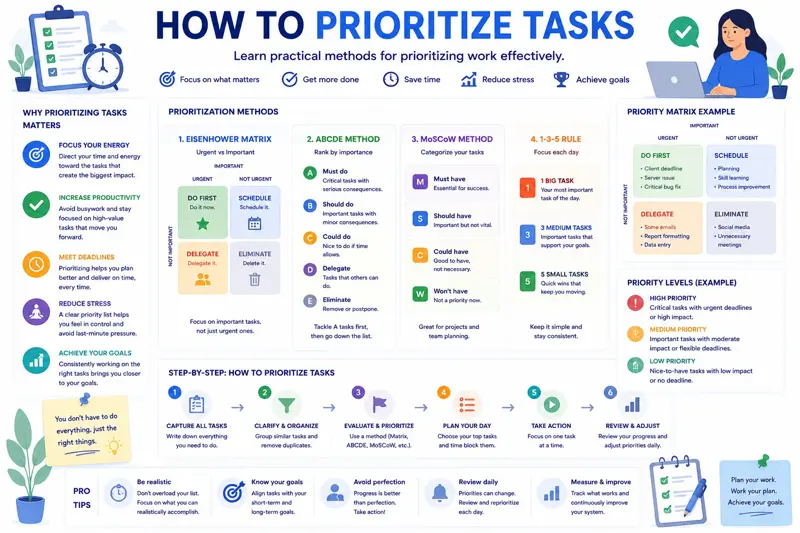
How to Prioritize Tasks Effectively Using the Eisenhower Matrix
One of the biggest challenges professionals face today is not the lack of work —it is deciding what should be done first.
Every morning begins with emails, meetings, customer requests, phone calls, project deadlines, and dozens of tasks competing for attention. Without a clear system for prioritization, people naturally focus on the loudest or most urgent activity instead of the work that creates the greatest value.
The result is familiar to many teams. Employees stay busy all day, yet important projects move forward slowly, deadlines are missed, and stress levels continue to rise.
Effective task prioritization solves this problem. Rather than reacting to every request immediately, it helps individuals and teams focus on the activities that contribute most to business goals.
Among the many prioritization techniques available today, the Eisenhower Matrix remains one of the simplest and most effective. Originally inspired by former U.S. President Dwight D. Eisenhower, this method divides work into four categories based on urgency and importance, making daily decision-making significantly easier.
In this guide, you'll learn how the Eisenhower Matrix works, why it improves productivity, common prioritization mistakes, and practical examples you can apply immediately in your own projects.
Why Prioritization Is More Important Than Ever
Modern workplaces generate more information than ever before. Employees receive hundreds of emails each week, participate in numerous online meetings, collaborate across multiple communication platforms, and manage several projects simultaneously.
Without clear priorities, people often become reactive instead of proactive. Instead of working toward strategic goals, they spend the day responding to whoever asks for something first.
Poor prioritization typically leads to:
- Missed deadlines.
- Increased stress.
- Lower productivity.
- Constant overtime.
- Project delays.
- Employee burnout.
- Reduced customer satisfaction.
Successful organizations recognize that productivity is not about completing more tasks—it's about completing the right tasks.
What Is the Eisenhower Matrix?
The Eisenhower Matrix is a simple decision-making framework that helps people evaluate every task according to two questions:
- Is this task important?
- Is this task urgent?
Based on the answers, every task belongs to one of four categories.
| Urgent | Not Urgent | |
|---|---|---|
| Important | Do First | Schedule |
| Not Important | Delegate | Eliminate |
Although the matrix looks simple, it fundamentally changes how people approach their daily workload.
Quadrant 1: Important and Urgent
These tasks require immediate attention because delaying them would have serious consequences.
Examples include:
- Critical customer issues.
- Production outages.
- Project deadlines due today.
- Emergency system failures.
- Legal compliance deadlines.
These activities should be completed as soon as possible.
However, if most of your work falls into this category, it often indicates poor planning rather than a naturally demanding job.
Quadrant 2: Important but Not Urgent
This is where the most valuable work happens.
These tasks contribute to long-term success but rarely demand immediate attention, making them easy to postpone.
Examples include:
- Strategic planning.
- Employee training.
- Process improvement.
- Business development.
- Project planning.
- Writing documentation.
- Preventive maintenance.
Unfortunately, because these activities rarely feel urgent, they are often delayed until they become emergencies.
Successful professionals intentionally reserve time for Quadrant 2 work before their schedule becomes overloaded.
Quadrant 3: Urgent but Not Important
These activities appear urgent because someone else needs an immediate response, but they do not significantly contribute to your own objectives.
Typical examples include:
- Interruptions from colleagues.
- Routine approval requests.
- Some phone calls.
- Many internal meetings.
- Minor administrative questions.
Whenever possible, these tasks should be delegated or handled during scheduled administrative periods rather than interrupting focused work.
Quadrant 4: Neither Important nor Urgent
These activities create very little value and should be minimized whenever possible.
Examples include:
- Mindless social media browsing.
- Unnecessary meetings.
- Repeatedly checking email.
- Reading irrelevant reports.
- Low-value administrative work.
Reducing time spent in this quadrant creates more capacity for meaningful work.
Apply the Matrix Every Morning
An effective way to build the habit is to review your task list at the beginning of each day.
Ask yourself:
- Which tasks must be completed today?
- Which tasks create long-term value?
- Which activities can be delegated?
- Which tasks should be removed completely?
This simple five-minute exercise often prevents hours of unproductive work.
Example: Project Manager
Imagine a project manager arriving at work with the following tasks:
| Task | Quadrant |
|---|---|
| Resolve a critical production issue | Important & Urgent |
| Prepare next month's project roadmap | Important, Not Urgent |
| Approve office supply request | Urgent, Not Important |
| Browse industry news for an hour | Neither Important nor Urgent |
Instead of treating every task equally, the manager immediately understands what deserves attention first and what can wait.
If you're looking for ways to organize your entire workday more effectively, our guide Time Blocking Explained shows how to combine prioritization with structured scheduling.
And once priorities are established, you'll also benefit from learning How to Track Project Progress Effectively, which explains how successful teams monitor milestones, workloads, and project health throughout execution.
Why Most People Prioritize Tasks Incorrectly
Many professionals believe they prioritize effectively simply because they complete a large number of tasks every day. Unfortunately, completing more work does not necessarily mean accomplishing the most valuable work.
One of the biggest mistakes is allowing urgency to replace importance. When every email, message, or phone call is treated as a top priority, truly important projects receive less attention.
Over time this creates a cycle of constant firefighting. Employees become busy reacting to immediate requests instead of preventing future problems.
Focus on High-Value Activities
Every task contributes differently to your goals. Some activities directly generate revenue, improve customer satisfaction, or move strategic projects forward. Others simply consume time.
Consider these examples:
| Activity | Business Value |
|---|---|
| Preparing a customer proposal | High |
| Reviewing project risks | High |
| Training employees | High |
| Reorganizing your inbox | Low |
| Attending unnecessary meetings | Low |
Prioritization becomes much easier when you consistently ask one simple question:
Which task creates the greatest value if completed today?
Use the 80/20 Principle
The Pareto Principle, often called the 80/20 rule, suggests that roughly 80% of results come from only 20% of activities.
While the exact percentages vary, the principle highlights an important idea: not every task deserves equal attention.
Examples include:
- 20% of customers generate most revenue.
- 20% of project risks cause most delays.
- 20% of daily tasks produce the greatest business impact.
When prioritizing work, identify those high-impact activities first before moving to routine tasks.
Learn to Delegate Effectively
Delegation is one of the most overlooked productivity skills.
Managers often keep too many responsibilities because they believe completing the work themselves will be faster. While this may be true in the short term, it creates bottlenecks and limits the team's overall productivity.
Tasks that are urgent but not strategically important are usually excellent candidates for delegation.
Examples include:
- Preparing routine reports.
- Scheduling meetings.
- Collecting project updates.
- Administrative documentation.
- Basic customer follow-ups.
Delegation allows managers to focus on planning, decision-making, and solving complex business problems.
Recognize Hidden Priorities
Not every important task comes with an obvious deadline.
Activities such as improving internal processes, documenting procedures, training employees, or reducing technical debt often remain postponed because they do not appear urgent.
Ironically, neglecting these tasks creates larger problems in the future.
Organizations that invest time in preventive work experience fewer emergencies, higher productivity, and smoother project execution.
Example: Prioritizing Tasks in a Software Development Team
Imagine a development team working on a customer portal while also handling daily support requests.
Without clear priorities, developers constantly switch between bug fixes, feature requests, meetings, and emails.
Using the Eisenhower Matrix, their work may look like this:
| Task | Priority |
|---|---|
| Fix production outage | Do First |
| Develop next release features | Schedule |
| Weekly status meeting | Delegate if possible |
| Organize old documents | Eliminate or postpone |
By separating strategic work from routine interruptions, the team spends more time building valuable features and less time reacting to distractions.
Example: Prioritizing Tasks for a Sales Manager
A sales manager may begin the day with dozens of activities competing for attention.
- Prepare a proposal for a major client.
- Respond to routine email inquiries.
- Approve employee travel expenses.
- Review monthly sales forecasts.
- Attend an optional internal meeting.
Instead of completing these tasks in the order they arrive, the manager focuses first on activities with the greatest business impact.
Winning a new customer is significantly more valuable than answering a routine internal email.
Review Priorities Throughout the Day
Priorities change as projects evolve.
A task that seemed unimportant in the morning may suddenly become critical if a customer reports an issue or a project milestone changes.
Many successful teams review priorities briefly after lunch and again before the end of the day.
These short reviews help identify new risks while ensuring important work continues moving forward.
Avoid These Common Prioritization Mistakes
- Starting the day by checking email.
- Treating every request as urgent.
- Working without defined priorities.
- Trying to multitask.
- Never delegating work.
- Ignoring long-term planning.
- Allowing meetings to consume the day.
- Failing to review priorities regularly.
Effective prioritization is not about working harder—it is about making better decisions regarding where your time and attention create the greatest value.
Once your priorities are clear, organizing your schedule becomes much easier. Our guide Time Blocking Explained shows how to assign dedicated time blocks to your highest-priority work, helping you stay focused and avoid constant interruptions.
Advanced Prioritization Techniques
While the Eisenhower Matrix is an excellent starting point, many organizations combine it with other prioritization methods to make even better decisions. Different techniques work well in different situations, especially when teams manage dozens or even hundreds of tasks simultaneously.
The ABCDE Method
The ABCDE method assigns every task a priority level:
- A – Must be completed today. Serious consequences if delayed.
- B – Important but not critical.
- C – Nice to complete but little consequence if postponed.
- D – Delegate whenever possible.
- E – Eliminate because the task adds little or no value.
This simple system works particularly well for daily planning because it forces you to distinguish between essential work and optional activities.
The MoSCoW Method
Popular in software development and project management, the MoSCoW method classifies work into four groups:
| Category | Description |
|---|---|
| Must Have | Essential requirements that cannot be postponed. |
| Should Have | Important features with some flexibility. |
| Could Have | Useful improvements if time allows. |
| Won't Have | Not included in the current phase. |
This approach helps teams avoid expanding project scope while ensuring that the most valuable work receives attention first.
Create a Weekly Priority Review
Daily prioritization is valuable, but weekly reviews provide a broader perspective.
At the beginning of each week, review:
- Project deadlines.
- Customer commitments.
- Team availability.
- High-risk activities.
- Upcoming meetings.
- Strategic objectives.
This habit helps managers identify potential conflicts before they become serious problems.
Prioritization Across the Entire Team
Individual prioritization is useful, but real productivity improvements occur when every member of the team works toward the same priorities.
Project managers should clearly communicate:
- Which projects have the highest priority.
- Which deadlines cannot move.
- Which tasks may be postponed.
- Which activities should be delegated.
Shared priorities reduce confusion and prevent employees from working on less important tasks simply because they were assigned first.
Measure Whether Your Priorities Are Correct
Good prioritization produces measurable results.
Consider tracking indicators such as:
- Percentage of high-priority tasks completed.
- Average project delay.
- Number of overdue tasks.
- Employee overtime hours.
- Customer satisfaction.
- Project completion rate.
Reviewing these metrics each month helps determine whether your prioritization process is actually improving business performance.
Weekly Task Prioritization Checklist
Use this checklist every Monday morning:
- Review project deadlines.
- Identify today's highest-impact task.
- Schedule strategic work before meetings.
- Delegate routine activities.
- Remove unnecessary tasks.
- Reserve time for unexpected issues.
- Review employee workloads.
- Confirm customer commitments.
- Update project priorities.
- Plan tomorrow before leaving today.
Spending just fifteen minutes reviewing priorities each week can save many hours of unproductive work later.
Related Articles
Want to become even more productive? Continue with these practical guides:
- Time Blocking Explained
- How to Organize Employees' Workday
- How to Track Project Progress Effectively
- How to Reduce Project Delays
- Planner vs Excel – Which Is Better?
- Kanban vs Gantt – When Should You Use Each?
Frequently Asked Questions
What is the Eisenhower Matrix?
It is a prioritization framework that classifies tasks according to urgency and importance, helping people decide what to do first, what to schedule, what to delegate, and what to eliminate.
What is the difference between urgent and important?
Urgent tasks require immediate attention, while important tasks contribute to long-term goals. The most productive professionals focus on important work before it becomes urgent.
How often should I prioritize my tasks?
Review priorities every morning, make adjustments during the day if necessary, and perform a more detailed review at the beginning of each week.
Should every task receive a priority?
Yes. Assigning priorities ensures that high-value work is completed before lower-value activities consume your time.
Can task prioritization improve team productivity?
Absolutely. Shared priorities help teams focus on the same objectives, reduce confusion, and improve collaboration.
Should meetings be treated as high-priority tasks?
Only when they contribute directly to project success or important business decisions. Many routine meetings can be shortened, delegated, or replaced with written updates.
What tools help with task prioritization?
Modern planning software that combines task management, calendars, project tracking, and dashboards makes prioritization much easier than relying on multiple spreadsheets or paper notes.
Can small businesses benefit from prioritization techniques?
Definitely. Small businesses often operate with limited resources, making it even more important to focus on work that creates the greatest business value.
Final Thoughts
Task prioritization is one of the most valuable skills any professional can develop. By distinguishing between urgent and important work, individuals and teams spend less time reacting to interruptions and more time achieving meaningful results.
The Eisenhower Matrix provides a simple but powerful framework for making better decisions every day. Combined with regular planning, effective delegation, and continuous review, it helps organizations improve productivity, reduce stress, and complete projects on time.
MyPlannerDesk helps teams put these principles into practice by bringing together task management, project planning, calendars, employee scheduling, workload tracking, and progress reporting in one centralized workspace. Managers can assign priorities, monitor deadlines, balance workloads, and ensure everyone is focused on the work that matters most.
Instead of juggling spreadsheets, emails, and disconnected tools, your entire team can collaborate from a single platform designed to improve organization, productivity, and project success.