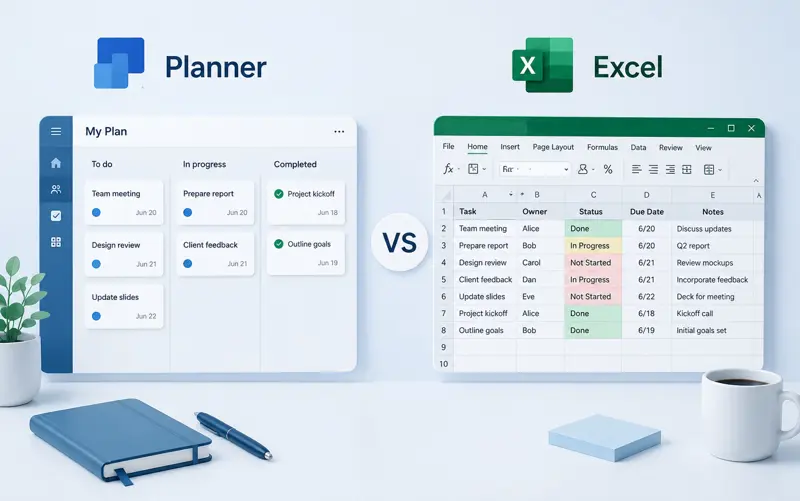
Planner vs Excel – Which Is Better for Project and Task Management?
Many businesses begin organizing projects with Microsoft Excel because it is familiar, flexible, and available almost everywhere. As teams grow, however, spreadsheets often become difficult to maintain. Dedicated planning software offers collaboration, automation, and visibility that spreadsheets simply cannot provide.
In this article, we'll compare Excel and modern planning software to help you decide which solution is right for your team.
Why Many Teams Start with Excel
Excel is one of the world's most popular business tools. It allows users to create custom tables, calculate values, build reports, and organize basic project information without additional software.
Typical reasons companies choose Excel include:
- No additional software costs.
- Most employees already know how to use it.
- Highly customizable spreadsheets.
- Suitable for small projects.
For a small team managing only a few tasks, Excel can be an effective starting point.
Where Excel Starts to Become a Problem
As projects become more complex, spreadsheets often create more work than they save.
- Multiple versions of the same file.
- Lost changes after email exchanges.
- No real-time collaboration.
- Difficult task tracking.
- No notifications or reminders.
- Limited reporting capabilities.
These challenges usually appear when several employees work on the same projects simultaneously.
Advantages of Modern Planning Software
Planning software is designed specifically for managing projects, employees, deadlines, and workloads.
Instead of maintaining multiple spreadsheets, all project information is stored in a single location where everyone can access the latest updates.
Real-Time Collaboration
Every team member works with the same data. There is no need to exchange files or worry about outdated versions.
Task Assignment
Managers can assign responsibilities directly to employees while tracking progress in real time.
Automatic Notifications
Employees receive reminders about upcoming deadlines and overdue tasks without manual follow-up.
Project Visibility
Managers instantly see project progress, completed work, bottlenecks, and team workload through dashboards and reports.
Excel vs Planner Comparison
| Feature | Excel | Planning Software |
|---|---|---|
| Task Management | Basic | Advanced |
| Team Collaboration | Limited | Real-Time |
| Notifications | No | Yes |
| Reporting | Manual | Automatic |
| Project Dashboard | No | Yes |
| Employee Workload | Difficult | Easy |
| Scalability | Limited | Excellent |
When Excel Is Still the Right Choice
Excel remains a good option for:
- Personal task lists.
- Very small businesses.
- Simple calculations.
- Budget planning.
- One-time project tracking.
When You Should Switch to Planning Software
Consider switching if:
- Your team has more than five employees.
- You manage multiple projects simultaneously.
- Deadlines are frequently missed.
- You spend too much time updating spreadsheets.
- You need better visibility across projects.
Benefits of Using MyPlannerDesk
MyPlannerDesk combines task management, project planning, employee scheduling, and reporting into one simple application.
- Create unlimited projects.
- Assign tasks in seconds.
- Track project progress.
- Monitor employee workload.
- Generate useful reports.
- Improve team collaboration.
Instead of managing dozens of Excel files, your entire organization works from one centralized platform.
Frequently Asked Questions
Is Excel good for project management?
Excel works well for small projects but becomes difficult to maintain as the number of tasks, employees, and deadlines increases.
What is the biggest advantage of planning software?
Real-time collaboration, automatic tracking, notifications, and centralized project management significantly improve productivity.
Can I import existing Excel data?
Most planning applications, including MyPlannerDesk, can import data from Excel to simplify migration.
Does planning software replace Excel?
Not completely. Excel is still excellent for calculations and financial analysis, while planning software is designed specifically for managing work, projects, and teams.
Final Thoughts
Excel has served businesses well for decades, but growing organizations need tools designed for collaboration and project management. Dedicated planning software reduces manual work, improves communication, and provides better visibility into every project.
If your team spends more time updating spreadsheets than completing work, it may be time to move to a modern planning solution like MyPlannerDesk.
Task Management: Manual vs Automated
Managing tasks is one of the areas where the differences between Excel and dedicated project management software become immediately apparent.
In Excel, every task must be entered manually. If a deadline changes, someone must update the spreadsheet. If a task is completed, another manual update is required. Managers often spend valuable time maintaining spreadsheets instead of managing projects.
Modern project management software automates much of this work. Tasks can be assigned directly to employees, deadlines trigger reminders automatically, and progress updates appear instantly for everyone involved.
| Task Management Feature | Excel | Project Management Software |
|---|---|---|
| Create Tasks | Manual | Built In |
| Assign Employees | Manual | Automatic |
| Task Status | Manual Updates | Real-Time |
| Comments | Limited | Integrated |
| Attachments | Separate Files | Built In |
| Notifications | No | Automatic |
As the number of tasks grows, automation becomes increasingly valuable because employees spend less time updating documents and more time completing work.
Project Scheduling
Project scheduling is another area where spreadsheets quickly become difficult to maintain.
While Excel can display project dates in rows and columns, changing one task often requires manually adjusting every dependent activity. This process becomes time-consuming and increases the likelihood of scheduling errors.
Dedicated project management software automatically recalculates schedules, updates dependencies, and immediately shows the impact of delays on the overall project timeline.
This capability becomes especially important for organizations managing multiple projects simultaneously.
Resource Planning
Most companies share employees across multiple projects. One engineer may be working on three customer implementations while also supporting internal initiatives.
Tracking this information in Excel usually requires several spreadsheets that must be updated continuously.
Project management software centralizes resource planning by showing employee availability, assigned projects, upcoming work, and potential scheduling conflicts from a single dashboard.
Managers can immediately identify overloaded employees and redistribute work before deadlines are affected.
Workload Management
Balancing workloads is extremely difficult when relying on spreadsheets alone. Although Excel can display assigned tasks, it does not automatically highlight employees who are over capacity.
Modern workload management tools provide visual indicators that show:
- Available capacity.
- Overloaded employees.
- Upcoming deadlines.
- Project conflicts.
- Team utilization.
- Resource availability.
This visibility helps organizations prevent burnout while improving project delivery.
Employee Time Tracking
Many organizations initially record employee working hours in spreadsheets. While this approach is simple, it often creates duplicate work because employees must manually enter hours and managers must manually verify them.
Integrated time tracking allows employees to record hours directly against projects and individual tasks. Managers receive accurate reports without copying information between multiple files.
Historical time data also improves future project estimates by comparing planned effort with actual recorded hours.
Employee Scheduling
Scheduling employees in Excel is possible, but maintaining shift changes, vacation requests, public holidays, and unexpected absences quickly becomes challenging.
Dedicated scheduling software automatically updates calendars, prevents conflicts, and provides employees with immediate access to the latest work schedule.
Managers spend less time creating schedules and more time supporting their teams.
Leave Management
Vacation tracking is another process that often begins in spreadsheets. Employees submit leave requests by email, managers manually update vacation tables, and HR departments reconcile records later.
Modern leave management systems automate approvals, maintain employee leave balances, and instantly update shared calendars after requests are approved.
This reduces administrative work while improving transparency for both employees and managers.
Reporting and Dashboards
Executives need timely information to make informed business decisions. Although Excel can generate reports, managers usually spend considerable time collecting, combining, and formatting data from multiple worksheets.
Project management software continuously updates dashboards using live project data.
Managers can instantly review:
- Project progress.
- Completed tasks.
- Upcoming deadlines.
- Employee workloads.
- Time tracking reports.
- Budget status.
- Project health indicators.
Because dashboards update automatically, management reports become available at any time without additional manual work.
Security and Version Control
One of the biggest risks of spreadsheet-based project management is version control.
Multiple copies of the same file are often shared by email, stored on local computers, or saved with different names. Team members may unknowingly update outdated versions, resulting in conflicting information and lost work.
Dedicated project management platforms maintain a single source of truth. Every authorized user accesses the same information, reducing errors while improving security and accountability.
Example: IT Consulting Company
An IT consulting company manages twenty customer projects at the same time. Initially, project plans, employee assignments, and timesheets are maintained in several Excel workbooks.
As the business grows, project managers spend hours each week updating spreadsheets, preparing reports, and resolving scheduling conflicts.
After adopting dedicated project management software, project schedules, resource planning, timesheets, dashboards, and customer communication are managed in one centralized system. Weekly reporting becomes almost automatic, allowing managers to focus on customer delivery rather than spreadsheet maintenance.
Connecting Planning, Tasks, and Collaboration
The greatest advantage of dedicated project management software is not a single feature but the integration of all business processes into one platform.
Tasks, schedules, employee workloads, calendars, time tracking, reports, and project documentation all remain connected. This eliminates duplicate data entry and improves collaboration across departments.
To learn more about organizing project schedules, read Gantt Chart: The Complete Guide.
If your organization manages employee capacity across multiple projects, continue with Resource Management: The Complete Guide.
You may also find Employee Time Tracking: The Complete Guide helpful for understanding how recorded work hours improve planning, forecasting, and project profitability.
Why Companies Eventually Move Beyond Excel
Excel is an outstanding spreadsheet application, but growing organizations eventually reach a point where manual processes consume too much time. Project managers begin spending more effort maintaining spreadsheets than actually managing projects.
As businesses expand, projects involve more employees, more customers, tighter deadlines, and greater expectations for transparency. Dedicated project management software helps organizations scale without dramatically increasing administrative work.
Common reasons companies move from Excel include:
- Managing multiple projects simultaneously.
- Growing project teams.
- Increasing customer demands.
- Need for real-time collaboration.
- Automatic notifications.
- Centralized documentation.
- Better reporting.
- Improved resource planning.
- Time tracking integration.
- Reduced manual administration.
- Improved project visibility.
- Better decision-making through live dashboards.
When Excel Is Still the Right Choice
Despite its limitations, Excel remains the right solution for many situations. Organizations should not replace spreadsheets simply because dedicated software exists. Instead, they should choose the tool that best matches the complexity of their work.
Excel is often sufficient when:
- Only one person manages the project.
- The project contains relatively few tasks.
- Collaboration is minimal.
- Scheduling changes are rare.
- No workflow automation is required.
- The spreadsheet is used mainly for calculations.
Many organizations successfully combine both approaches by using Excel for financial analysis while managing projects in specialized software.
When Project Management Software Is the Better Option
Dedicated project management software becomes increasingly valuable as projects grow in size and complexity.
It is usually the better choice when:
- Multiple people work on the same project.
- Projects contain hundreds of tasks.
- Employees work remotely.
- Deadlines change frequently.
- Resources are shared across projects.
- Managers require live dashboards.
- Time tracking is important.
- Vacation planning affects project schedules.
- Customers expect regular status updates.
- Business growth requires standardized processes.
Excel vs Project Management Software: Decision Guide
| Your Situation | Recommended Tool |
|---|---|
| Personal task list | Excel |
| Simple project planning | Excel |
| Budget calculations | Excel |
| Multiple employees | Project Management Software |
| Shared projects | Project Management Software |
| Task assignments | Project Management Software |
| Employee scheduling | Project Management Software |
| Resource planning | Project Management Software |
| Time tracking | Project Management Software |
| Executive reporting | Project Management Software |
Common Mistakes When Managing Projects in Excel
Organizations often try to solve growing project management challenges by creating increasingly complex spreadsheets. While this may work temporarily, it usually increases maintenance effort rather than improving productivity.
- Using multiple versions of the same workbook.
- Tracking projects in separate spreadsheets.
- Copying data manually between files.
- Building overly complex formulas.
- Depending on manual status updates.
- Storing documents outside the project file.
- Using email instead of centralized collaboration.
- Ignoring workload balancing.
- Creating reports manually every week.
- Not keeping historical project information.
Real-World Example: Construction Company
A construction company originally managed every project using Excel. Individual spreadsheets tracked subcontractors, equipment, material deliveries, project schedules, and budgets.
As the company expanded, maintaining dozens of spreadsheets became increasingly difficult. Site managers often worked with outdated information, and weekly management reporting required several hours of manual work.
After implementing project management software, project schedules, task assignments, resource planning, and progress reporting became centralized. Managers could immediately identify delays and allocate resources before project deadlines were affected.
Real-World Example: Marketing Agency
A growing marketing agency managed campaigns using Excel combined with email, shared folders, and messaging applications.
While this worked for a small team, coordinating designers, copywriters, advertising specialists, SEO consultants, and account managers eventually became difficult.
Moving to a collaborative project management platform reduced administrative work while providing complete visibility into campaign progress, deadlines, and team workloads.
Real-World Example: Software Company
A software development company initially tracked sprint planning, bug fixes, testing activities, and release schedules in spreadsheets.
As more developers joined the organization, manual coordination became a major challenge. Dedicated project management software introduced integrated task management, Kanban boards, Gantt charts, time tracking, and sprint reporting, allowing development teams to collaborate much more efficiently.
Frequently Asked Questions
Can Excel be used for project management?
Yes. Excel can manage small projects, task lists, budgets, and schedules. However, as project complexity increases, dedicated project management software usually provides better collaboration, automation, and reporting.
Is Excel suitable for team collaboration?
Excel supports basic collaboration, but it lacks many project management features such as integrated task assignments, workflow automation, real-time notifications, workload management, and project dashboards.
What is the biggest advantage of project management software?
The greatest advantage is centralization. Tasks, projects, schedules, documents, communication, reports, and employee workloads are managed in one system instead of multiple spreadsheets.
Should small businesses replace Excel?
Not necessarily. Very small teams may successfully use Excel for simple projects. As collaboration and project complexity increase, dedicated software usually becomes a better long-term investment.
Can project management software replace spreadsheets completely?
Not always. Many organizations continue using Excel for financial analysis, forecasting, and calculations while using project management software for planning, collaboration, and project execution.
Related Articles
- Project Management: The Complete Guide
- Project Planning Step by Step
- Gantt Chart: The Complete Guide
- Kanban Board: The Complete Guide
- Kanban vs Gantt: When to Use Each
- Resource Management: The Complete Guide
- Workload Management: The Complete Guide
- Employee Time Tracking: The Complete Guide
- How to Track Project Progress Effectively
- How to Reduce Project Delays
Final Thoughts
Excel remains one of the most valuable business applications ever created and continues to be an excellent choice for calculations, financial analysis, forecasting, and managing simple datasets. However, project management has evolved far beyond static spreadsheets.
Modern organizations need real-time collaboration, automated workflows, resource planning, employee scheduling, time tracking, workload management, document sharing, and live reporting. These capabilities allow teams to respond quickly to changing priorities while reducing administrative work and improving project visibility.
MyPlannerDesk is designed for organizations that have outgrown spreadsheet-based project management. It combines Project Management, Task Management, Gantt Charts, Kanban Boards, Resource Management, Workload Management, Employee Scheduling, Time Tracking, Leave Management, Shared Calendars, Dashboards, and Reporting in a single cloud-based platform. Instead of maintaining multiple Excel files, teams can plan, execute, and monitor projects collaboratively from one centralized workspace.
If your organization still relies on spreadsheets for managing projects, switching to a modern project management solution can reduce manual work, improve collaboration, increase visibility, and help your team deliver projects more efficiently as your business continues to grow.