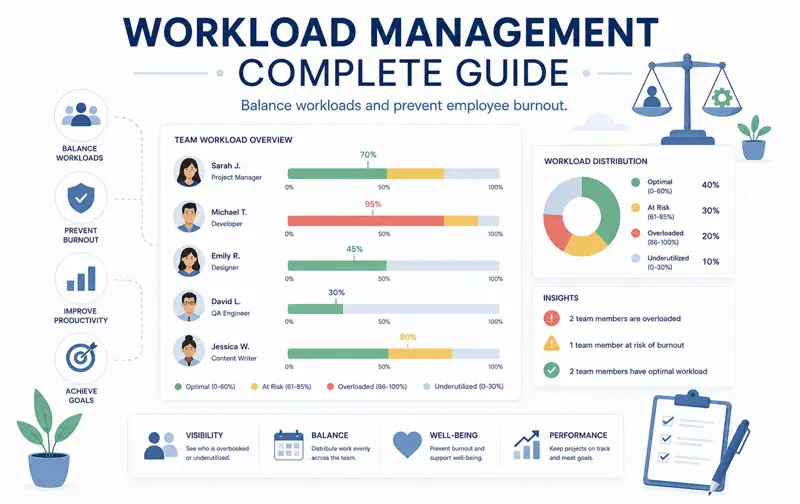
Workload Management: The Complete Guide to Balancing Team Capacity and Improving Productivity
One of the biggest challenges facing modern organizations is ensuring that work is distributed fairly across the team. Some employees become overloaded with tasks and deadlines, while others have available capacity that goes unused. Over time, this imbalance reduces productivity, increases stress, and negatively affects both employee satisfaction and project success.
Workload management is the process of planning, monitoring, and balancing work so every employee has an appropriate amount of responsibility. When workloads are managed effectively, projects move forward smoothly, deadlines are met more consistently, and teams collaborate more efficiently.
Unfortunately, many organizations still rely on spreadsheets, email threads, and manual planning to allocate work. These methods quickly become difficult to manage as projects become more complex and teams grow larger.
Modern workload management software provides managers with real-time visibility into employee capacity, project assignments, vacation schedules, and upcoming deadlines. Instead of making assumptions, managers can make informed decisions based on accurate data.
This comprehensive guide explains everything you need to know about workload management, including planning techniques, capacity management, workload balancing strategies, key performance metrics, and best practices used by successful organizations.
What Is Workload Management?
Workload management is the process of assigning, monitoring, and adjusting work so that employees can complete their responsibilities efficiently without being overloaded or underutilized.
Unlike simple task assignment, workload management considers the overall capacity of every employee, including their current projects, availability, skills, vacation plans, and working hours.
The primary objective is to maximize productivity while maintaining sustainable workloads that support employee wellbeing.
Why Workload Management Is Important
Organizations that ignore workload management often experience project delays, employee burnout, declining quality, and increasing staff turnover.
By monitoring workloads continuously, managers can identify problems before they begin affecting project delivery.
Effective workload management helps organizations:
- Improve employee productivity.
- Reduce project delays.
- Prevent employee burnout.
- Improve work quality.
- Reduce overtime costs.
- Increase employee satisfaction.
- Improve project forecasting.
- Support business growth.
Rather than assigning work based on assumptions, managers can allocate tasks according to actual employee capacity.
Understand Employee Capacity
Before assigning new work, managers must understand how much capacity each employee actually has.
Capacity is influenced by many factors, including:
- Working hours.
- Existing task assignments.
- Project deadlines.
- Vacation.
- Sick leave.
- Meetings.
- Training sessions.
- Administrative responsibilities.
For example, an employee who appears available may actually spend several hours each day supporting customers or attending recurring meetings.
Ignoring these responsibilities often results in unrealistic workloads and missed deadlines.
Different Types of Workload
Not every task requires the same amount of effort. Managers should recognize the different types of workload before distributing work across the team.
| Workload Type | Examples |
|---|---|
| Operational | Daily support, administration, reporting. |
| Project Work | Development, implementation, client projects. |
| Strategic Work | Planning, research, process improvement. |
| Urgent Work | Production issues, customer escalations. |
| Recurring Work | Weekly reports, monthly reviews. |
Considering workload categories helps managers distribute responsibilities more fairly while ensuring that strategic work is not neglected because of urgent daily activities.
Recognize Signs of Employee Overload
Employee overload rarely happens overnight. It usually develops gradually as additional responsibilities are added without adjusting existing workloads.
Managers should monitor warning signs such as:
- Frequent overtime.
- Missed deadlines.
- Declining work quality.
- Increased stress.
- Higher absenteeism.
- Reduced collaboration.
- More project delays.
- Lower employee engagement.
Early intervention helps prevent burnout while maintaining team performance.
Recognize Underutilized Employees
Workload management is not only about preventing overload. Employees with too little work may also become disengaged and less productive.
Signs of underutilization include:
- Consistently low task volume.
- Long periods without assignments.
- Idle project capacity.
- Limited participation.
- Reduced motivation.
Managers should redistribute work whenever possible so that available capacity is fully utilized.
Balance Work Across the Team
One of the most effective workload management techniques is balancing work across all available employees rather than relying on a small group of top performers.
Balanced workloads provide several advantages:
- Higher productivity.
- Lower stress.
- Better collaboration.
- Improved knowledge sharing.
- Reduced employee turnover.
- Greater scheduling flexibility.
Instead of asking the same experienced employees to solve every urgent problem, successful organizations develop multiple team members who can share important responsibilities.
Monitor Workload Continuously
Workload management is an ongoing process rather than a one-time planning activity.
Managers should review employee workloads weekly and ask questions such as:
- Who is overloaded?
- Who has available capacity?
- Which projects require additional resources?
- Which deadlines are approaching?
- Are vacation schedules affecting capacity?
- Have priorities changed?
Regular workload reviews allow managers to make proactive adjustments before small problems become major project delays.
Example Workload Dashboard
| Employee | Capacity | Assigned | Status |
|---|---|---|---|
| Emma | 40 h | 38 h | Balanced |
| Michael | 40 h | 48 h | Overloaded |
| Sarah | 40 h | 28 h | Available |
| David | 40 h | 40 h | Optimal |
A workload dashboard provides managers with immediate visibility into team capacity, making it easier to redistribute work before schedules become unrealistic.
If you're also planning employee schedules, continue with our guide Employee Scheduling: The Complete Guide .
You may also benefit from reading Project Management: The Complete Guide , which explains how workload planning fits into successful project delivery.
Capacity Planning
Capacity planning is the process of determining whether your team has enough available time and resources to complete current and future work. Instead of reacting after employees become overloaded, managers estimate workload weeks or months in advance and make adjustments before problems occur.
Effective capacity planning answers questions such as:
- Do we have enough people for upcoming projects?
- Which departments are approaching full capacity?
- Will vacations affect project delivery?
- Should additional employees be hired?
- Can work be redistributed between teams?
Organizations that regularly review capacity are much less likely to experience unexpected delays or excessive overtime.
Resource Allocation
Resource allocation is the process of assigning the right people to the right tasks at the right time.
Effective allocation considers much more than employee availability. Managers should evaluate:
- Technical skills.
- Experience.
- Current workload.
- Project priorities.
- Customer requirements.
- Estimated effort.
Assigning work based only on availability often creates quality problems, because the most suitable employee may not be the first available employee.
Resource Leveling
Resource leveling helps balance workloads when demand exceeds available capacity.
Instead of forcing employees to work excessive overtime, managers may:
- Move deadlines.
- Redistribute tasks.
- Assign additional team members.
- Reduce project scope.
- Delay lower-priority work.
The objective is to maintain realistic workloads while protecting important project deadlines.
Forecast Future Workloads
Historical data is one of the most valuable tools for workload planning.
Managers should analyze previous projects to identify recurring workload patterns and prepare for future demand.
Examples include:
- Seasonal business peaks.
- Annual reporting periods.
- Holiday staffing reductions.
- Product launches.
- Major customer contracts.
Forecasting allows organizations to prepare staffing plans before workloads increase dramatically.
Prioritize High-Value Work
Not every task contributes equally to business success. Effective workload management requires managers to distinguish between urgent work and important work.
Employees should spend most of their time on activities that create measurable value for customers and the organization.
Whenever workloads become excessive, managers should evaluate whether some lower-value activities can be postponed, delegated, or eliminated entirely.
Prevent Employee Burnout
Burnout is one of the most serious consequences of poor workload management. It develops gradually when employees experience prolonged periods of excessive workload without adequate recovery.
Common warning signs include:
- Constant overtime.
- Reduced motivation.
- Lower work quality.
- Difficulty concentrating.
- Higher absenteeism.
- Increased mistakes.
- Declining collaboration.
Managers should regularly discuss workload with employees rather than assuming that everything is under control simply because deadlines are being met.
Measure Resource Utilization
Resource utilization measures how effectively employee capacity is being used.
Very low utilization may indicate that valuable resources are underused, while extremely high utilization often signals overload.
Many organizations aim for utilization levels that leave enough flexibility to handle unexpected work without creating excessive stress.
| Utilization | Typical Interpretation |
|---|---|
| Below 60% | Underutilized |
| 60–80% | Healthy capacity |
| 80–90% | Busy but manageable |
| Above 90% | Risk of overload |
Important Workload KPIs
Tracking key performance indicators helps managers evaluate workload objectively instead of relying on assumptions.
| KPI | Purpose |
|---|---|
| Capacity Utilization | Measures available working capacity. |
| Task Completion Rate | Shows delivery performance. |
| Average Workload | Compares employee assignments. |
| Overtime Hours | Identifies overload. |
| Project Delay Rate | Measures schedule reliability. |
| Resource Availability | Shows remaining team capacity. |
Example: IT Development Team
A software company has ten developers working on three projects. Without workload management, the most experienced developers receive almost every high-priority assignment.
Within a few months:
- Senior developers regularly work overtime.
- Junior developers have unused capacity.
- Projects become dependent on a few individuals.
- Delivery times increase.
After introducing workload dashboards and capacity planning, project managers redistribute tasks according to both skill level and available capacity. Senior employees focus on complex work while junior developers receive additional responsibilities with appropriate mentoring.
The result is a more balanced team, improved knowledge sharing, and faster project delivery.
Example: Marketing Department
A marketing agency manages content creation, advertising campaigns, social media, email marketing, and SEO for dozens of clients.
By monitoring workload weekly, managers quickly identify employees approaching full capacity and redistribute campaigns before deadlines are affected.
Instead of discovering problems after clients complain, managers prevent overload before it impacts service quality.
If you're interested in improving project execution, continue with How to Track Project Progress Effectively .
You may also find Kanban Board: The Complete Guide to Visual Task Management helpful for visualizing workloads across projects and departments.
Workload Management Best Practices
Successful organizations do not wait until employees become overwhelmed before reviewing workloads. Instead, they continuously monitor capacity, priorities, and project progress to ensure work remains balanced across the team.
The following best practices can significantly improve workload management in organizations of any size.
- Review employee workloads every week.
- Prioritize work based on business value.
- Limit overtime whenever possible.
- Assign work according to skills and experience.
- Monitor employee availability.
- Track vacation schedules.
- Use shared calendars.
- Visualize workloads using dashboards.
- Review project priorities regularly.
- Communicate workload changes immediately.
Common Workload Management Mistakes
Many workload problems are caused by management processes rather than employee performance. Recognizing common mistakes helps organizations avoid unnecessary stress and delays.
- Assigning work only to top performers.
- Ignoring employee capacity.
- Failing to prioritize tasks.
- Not updating project plans.
- Overlooking recurring responsibilities.
- Ignoring vacation schedules.
- Creating unrealistic deadlines.
- Monitoring only completed work.
- Failing to redistribute workloads.
- Using disconnected spreadsheets.
Avoiding these mistakes leads to more predictable project delivery and healthier working conditions.
How Technology Improves Workload Management
Modern workload management software provides managers with real-time visibility that is almost impossible to achieve using spreadsheets.
Instead of collecting information from multiple sources, managers can view employee capacity, project progress, deadlines, and availability from a single dashboard.
Common software features include:
- Interactive workload dashboards.
- Project timelines.
- Kanban boards.
- Task management.
- Employee calendars.
- Leave management.
- Capacity planning.
- Resource allocation reports.
- Automatic notifications.
- Productivity reporting.
Centralizing workload information improves decision-making while reducing administrative effort.
Use Dashboards for Better Visibility
Dashboards allow managers to identify workload problems at a glance.
Instead of reading lengthy reports, visual indicators immediately highlight:
- Overloaded employees.
- Available capacity.
- Projects at risk.
- Approaching deadlines.
- Department utilization.
- Outstanding tasks.
Managers can respond more quickly because important information is presented in a simple visual format.
Real-World Example: Construction Company
A construction company manages several building projects simultaneously. Engineers, site managers, electricians, plumbers, and subcontractors all share limited resources.
Without workload planning, certain specialists are assigned to multiple sites during the same week, creating scheduling conflicts and project delays.
By implementing workload management software, project managers gain visibility into each employee's availability and upcoming assignments.
Conflicts are identified weeks before construction begins, allowing schedules to be adjusted without delaying projects.
Real-World Example: Customer Support Team
A customer support department receives highly variable ticket volumes throughout the week.
Historical reports show that Mondays consistently generate the highest number of customer requests.
Managers respond by scheduling additional support agents on Mondays and redistributing administrative work to quieter periods later in the week.
Customer response times improve while employee stress decreases because workloads are aligned with actual demand.
Workload Management Checklist
- Review employee availability.
- Check approved leave requests.
- Analyze project priorities.
- Estimate task effort.
- Review current capacity.
- Balance workloads across the team.
- Assign tasks based on skills.
- Monitor overtime.
- Track utilization rates.
- Review project deadlines.
- Monitor workload dashboards.
- Identify bottlenecks.
- Update priorities weekly.
- Redistribute overloaded work.
- Schedule regular team reviews.
- Forecast future workloads.
- Monitor recurring tasks.
- Review workload reports monthly.
- Gather employee feedback.
- Continuously improve planning processes.
Frequently Asked Questions
What is workload management?
Workload management is the process of planning, assigning, monitoring, and balancing work across employees to ensure projects are completed efficiently without overloading individuals.
Why is workload management important?
It improves productivity, reduces employee burnout, minimizes overtime, supports better project planning, and increases employee satisfaction.
What is capacity planning?
Capacity planning determines whether available employee time and resources are sufficient to complete current and future work.
What is resource allocation?
Resource allocation is the process of assigning the right people to the right tasks based on skills, availability, priorities, and project requirements.
How often should workloads be reviewed?
Most organizations benefit from reviewing workloads weekly, while larger projects may require daily monitoring.
What causes employee overload?
Common causes include unrealistic deadlines, poor planning, excessive multitasking, insufficient staffing, and uneven task distribution.
Can workload management reduce project delays?
Yes. Balanced workloads help teams complete work on time while reducing the risk of missed deadlines and resource conflicts.
What software supports workload management?
Modern workload management platforms combine project planning, employee calendars, task management, Kanban boards, dashboards, reporting, and resource planning into one centralized solution.
Related Articles
- Project Management: The Complete Guide
- Task Management: The Complete Guide
- Project Planning Step by Step
- How to Track Project Progress Effectively
- How to Reduce Project Delays
- Kanban Board: The Complete Guide to Visual Task Management
- Employee Scheduling: The Complete Guide
- Employee Leave Management: The Complete Guide
- Time Management: The Complete Guide
Final Thoughts
Workload management is one of the most important responsibilities of every manager. Assigning work fairly, monitoring employee capacity, and adjusting plans proactively helps organizations deliver projects on time while creating a healthier and more productive workplace.
As teams grow and projects become more complex, manual workload planning using spreadsheets becomes increasingly difficult. Centralizing project assignments, employee availability, task management, and reporting provides managers with the visibility they need to make informed decisions quickly.
MyPlannerDesk includes powerful workload management tools that help organizations balance employee capacity, monitor utilization, visualize team workloads, manage projects, assign tasks, track deadlines, and coordinate resources from one centralized platform. Interactive dashboards, shared calendars, Kanban boards, project timelines, and reporting enable managers to identify bottlenecks early and optimize team performance.
Whether you manage a small team or a large organization, investing in effective workload management creates better collaboration, reduces stress, improves resource utilization, and increases the likelihood of delivering every project successfully and on time.