How to Track Project Progress Effectively: A Complete Guide for Modern Teams
Every successful project depends on one essential activity: tracking progress. Without accurate and timely information, project managers cannot identify delays, allocate resources efficiently, or make informed decisions. Unfortunately, many organizations still rely on manual status updates, spreadsheets, or lengthy meetings that provide only a partial picture of what is actually happening.
Effective project progress tracking is much more than checking whether tasks are completed. It involves monitoring milestones, deadlines, team performance, risks, budgets, and overall project health. When done correctly, progress tracking helps organizations deliver projects on time, improve collaboration, and increase customer satisfaction.
In this guide, you'll learn proven techniques for tracking project progress, discover the most important metrics to monitor, and see practical examples that can help teams of any size stay organized.
Why Project Progress Tracking Matters
Imagine driving to a destination without looking at the road signs or your GPS. You might eventually arrive, but chances are you'll waste time, take wrong turns, or become completely lost.
Projects work the same way. Without regular progress tracking, managers don't know whether the project is moving according to plan until it's too late.
Companies that consistently monitor project progress are more likely to:
- Deliver projects on schedule.
- Detect problems before they become critical.
- Improve communication between departments.
- Use resources more efficiently.
- Increase customer satisfaction.
- Reduce project costs.
Progress tracking creates transparency. Everyone—from project managers to team members and stakeholders—knows exactly where the project stands.
Define Success Before Work Begins
One of the biggest mistakes organizations make is trying to measure progress without first defining what success looks like.
Every project should begin with clearly documented objectives. These objectives become the baseline against which progress is measured.
For example, instead of writing:
Improve the company website.
Define measurable goals such as:
- Launch the redesigned website by September 30.
- Reduce page load time below two seconds.
- Increase online inquiries by 20%.
- Support mobile devices.
- Publish twenty new blog articles.
Specific goals make progress measurable. Vague goals make reporting almost impossible.
Break the Project into Milestones
Tracking an entire project as a single activity rarely works. Instead, divide the project into logical milestones that represent meaningful achievements.
For example, a website development project might include:
| Milestone | Target Date |
|---|---|
| Requirements Approved | May 5 |
| Design Completed | May 20 |
| Development Finished | June 25 |
| Testing Completed | July 10 |
| Website Launch | July 15 |
Milestones provide clear checkpoints throughout the project. Missing one milestone is often an early warning that the final deadline is also at risk.
Track Tasks Instead of Assumptions
Many managers ask employees questions such as:
"How is the project going?"
The answer is often subjective:
"It's going well."
Instead of relying on opinions, monitor measurable task completion.
Every task should have:
- A clear owner.
- A due date.
- A current status.
- An estimated duration.
- A completion percentage when appropriate.
Objective data provides a much clearer picture than verbal updates during meetings.
Use Key Performance Indicators (KPIs)
Project managers often focus only on completed tasks, but successful tracking includes several performance indicators.
Useful KPIs include:
- Completed tasks.
- Overdue tasks.
- Average task completion time.
- Milestones completed.
- Budget utilization.
- Open project risks.
- Team workload.
- Customer change requests.
Monitoring these indicators helps managers understand not only what has been completed, but also whether the project remains healthy.
Create One Source of Truth
One of the fastest ways to lose visibility is storing project information in multiple places.
Imagine this situation:
- The project schedule is stored in Excel.
- Tasks are discussed in Microsoft Teams.
- Documents are saved in SharePoint.
- Status updates arrive by email.
- Meeting notes are kept in Word documents.
Employees spend valuable time searching for information instead of completing their work.
Modern planning software solves this problem by keeping projects, tasks, documents, comments, deadlines, and reports in one centralized location. Everyone works with the same information, reducing confusion and improving decision-making.
Review Progress Regularly
Tracking project progress should become part of your team's routine rather than an occasional activity performed only before management meetings.
Many successful organizations follow a simple rhythm:
- Daily review of active tasks.
- Weekly review of milestones.
- Monthly review of budgets and resources.
- Quarterly review of overall project performance.
Regular reviews make it easier to detect trends before they become serious problems.
If your projects frequently miss deadlines, our guide How to Reduce Project Delays explains practical techniques for identifying risks early and keeping projects on schedule.
Choose the Right Project View
Different projects require different visualization methods.
A software development team may benefit from a Kanban board, while a construction project often requires a Gantt chart with task dependencies and timelines.
Choosing the right visualization makes progress easier to understand for both project managers and stakeholders.
If you're deciding between these two approaches, read our detailed comparison: Kanban vs Gantt – When Should You Use Each?.
Organizations that still rely heavily on spreadsheets should also consider whether dedicated planning software could improve visibility. Our article Planner vs Excel – Which Is Better for Project Management? compares both approaches and explains when it's time to move beyond Excel.
Build Dashboards That Managers Actually Use
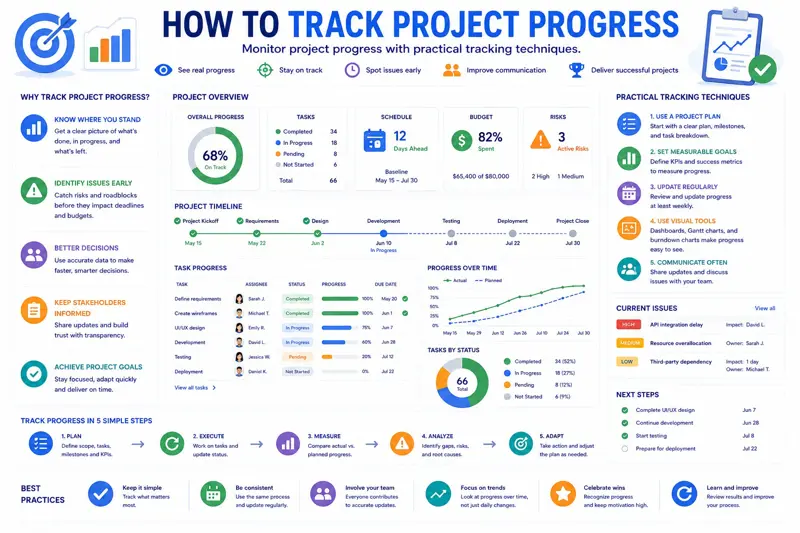
Project dashboards provide a visual overview of everything happening within a project. Unfortunately, many dashboards become cluttered with dozens of charts, making it difficult to identify what really matters.
An effective dashboard should answer five questions immediately:
- Are we on schedule?
- Which tasks are overdue?
- Who is overloaded?
- Are we within budget?
- What requires management attention today?
If your dashboard cannot answer these questions in less than a minute, it is probably displaying too much information.
Example Dashboard
| Metric | Status |
|---|---|
| Project Completion | 68% |
| Tasks Completed | 154 / 220 |
| Overdue Tasks | 7 |
| Upcoming Deadlines | 12 This Week |
| Budget Used | 61% |
| Critical Risks | 2 |
A dashboard like this gives management an instant overview without reading lengthy reports.
Track Project Budget Alongside Progress
A project may appear to be progressing well while quietly exceeding its budget. For this reason, progress tracking should always include financial monitoring.
Review budget usage regularly by comparing:
- Planned budget.
- Actual spending.
- Remaining budget.
- Estimated final cost.
Consider a project with a planned budget of €100,000. After only 40% of the work is completed, €75,000 has already been spent. Although tasks are progressing, the project is clearly moving toward a budget overrun.
Identifying this situation early gives managers time to adjust resources, renegotiate scope, or improve efficiency before costs become unmanageable.
Measure Progress Without Micromanaging Employees
Some managers believe project tracking requires monitoring every employee throughout the day. In reality, excessive supervision often reduces productivity and lowers morale.
Instead of measuring activity, measure outcomes.
Ask questions such as:
- Were assigned tasks completed?
- Were deadlines met?
- Were quality standards achieved?
- Were project milestones reached?
This approach gives employees the flexibility to work efficiently while keeping project managers informed about actual progress.
Use the RAG Status Method
Many organizations simplify project reporting using the RAG method:
| Status | Meaning | Recommended Action |
|---|---|---|
| Green | Project is on schedule. | Continue as planned. |
| Amber | Potential issues detected. | Monitor closely and prepare corrective actions. |
| Red | Critical delays or risks. | Immediate management intervention required. |
Using simple color indicators helps executives quickly understand the health of multiple projects without reading detailed reports.
Monitor Team Workload
Projects often fall behind because some employees become overloaded while others remain underutilized.
For example:
| Employee | Assigned Tasks | Status |
|---|---|---|
| John | 18 | Overloaded |
| Emily | 9 | Available |
| David | 14 | Balanced |
| Sarah | 7 | Available |
Redistributing work before deadlines approach is much easier than trying to recover after delays have already occurred.
Practical Example: Marketing Campaign
Imagine a marketing team preparing a product launch. The project includes content creation, graphic design, advertising campaigns, email marketing, and social media publishing.
Instead of reviewing progress only once a month, the team tracks:
- Articles published.
- Graphics completed.
- Advertisements approved.
- Landing pages created.
- Email campaigns scheduled.
- Campaign launch readiness.
Weekly reviews reveal bottlenecks early, allowing managers to move resources where they are needed most.
Practical Example: Software Development
A software company developing a new CRM system divides work into multiple development sprints.
Instead of reporting only the percentage of completion, managers monitor:
- User stories completed.
- Open bugs.
- Critical defects.
- Code review completion.
- Automated test coverage.
- Deployment readiness.
This provides a far more realistic view of project health than simply reporting that "development is 80% complete."
Avoid These Common Tracking Mistakes
Even experienced project managers make mistakes when tracking progress. Common issues include:
- Updating project status too infrequently.
- Reporting percentages based on opinions instead of completed work.
- Ignoring small delays until they become major problems.
- Tracking too many metrics.
- Failing to communicate progress with stakeholders.
- Keeping project information in multiple systems.
The goal of project tracking is not collecting more data—it is making better decisions based on accurate information.
Automate Progress Tracking Whenever Possible
Manual reporting consumes valuable time that could be spent completing project work.
Modern planning software automatically updates dashboards as employees complete tasks, reducing administrative work while providing managers with real-time visibility.
Automation also reduces human error and ensures everyone is working from the latest project information instead of outdated spreadsheets or email updates.
Present Project Progress Clearly to Stakeholders
Tracking project progress is only valuable if the information is communicated effectively. Executives, clients, and project sponsors usually do not need to see every completed task. Instead, they want a clear overview of whether the project is on schedule, within budget, and moving toward its objectives.
A good status report should answer a few essential questions:
- Is the project on schedule?
- What has been completed since the last report?
- What will be completed next?
- Are there any risks?
- Does management need to make any decisions?
Keeping reports short and focused allows stakeholders to understand the project quickly without reading lengthy documents.
Create a Project Health Score
Many organizations combine several project indicators into a single health score. This makes it easier to compare multiple projects and identify those requiring immediate attention.
| Area | Status |
|---|---|
| Schedule | Excellent |
| Budget | Good |
| Quality | Excellent |
| Risks | Medium |
| Customer Satisfaction | Good |
Instead of reviewing dozens of reports, management can immediately identify which projects require additional support.
Track Trends Instead of Individual Numbers
Looking at a single status update rarely tells the complete story. The real value comes from observing trends over time.
For example, if the number of overdue tasks increases every week, this usually indicates a growing workload problem even if the project still appears to be on schedule.
Similarly, if completed tasks steadily increase while overdue tasks decrease, the project is moving in a healthy direction.
Trend analysis helps managers make proactive decisions instead of reacting after deadlines have already been missed.
10 Signs Your Project Is Falling Behind
- Milestones are regularly postponed.
- Employees frequently work overtime.
- Too many tasks remain "In Progress".
- Project meetings become longer every week.
- Client change requests increase.
- Critical tasks have no assigned owner.
- Budget consumption is higher than expected.
- Team members report conflicting priorities.
- Quality issues become more common.
- Managers spend more time collecting information than managing the project.
Recognizing these warning signs early allows corrective actions before they affect project delivery.
Weekly Progress Review Checklist
A simple checklist helps project managers maintain consistency across all projects.
- Review completed tasks.
- Identify overdue activities.
- Confirm milestone completion.
- Review project risks.
- Check employee workload.
- Update project schedule.
- Review project budget.
- Communicate important updates.
- Resolve blocked tasks.
- Plan priorities for next week.
Following this routine every week dramatically improves project visibility and reduces unexpected delays.
Best Practices for Effective Progress Tracking
- Define measurable goals before work begins.
- Break projects into milestones.
- Assign one owner to every task.
- Review progress daily.
- Hold short weekly planning meetings.
- Monitor project risks continuously.
- Keep documentation up to date.
- Use dashboards instead of spreadsheets.
- Automate reporting whenever possible.
- Learn from completed projects.
Related Articles
Continue learning with these practical project management guides:
- How to Reduce Project Delays
- Planner vs Excel – Which Is Better?
- Kanban vs Gantt – When Should You Use Each?
- How to Organize Employees' Workday
- Time Blocking Explained
Frequently Asked Questions
How often should project progress be tracked?
Daily task updates combined with weekly project reviews provide the best balance between visibility and productivity.
What is the best way to measure project progress?
Measure completed work against predefined milestones, deadlines, budgets, and project objectives rather than relying on subjective opinions.
Should every project have KPIs?
Yes. Even small projects benefit from measurable indicators such as completed tasks, overdue activities, milestone completion, and budget utilization.
How do dashboards improve project management?
Dashboards provide real-time visibility into project performance, allowing managers to identify problems immediately instead of waiting for status meetings.
Can Excel be used for project tracking?
Excel is suitable for smaller projects but becomes difficult to maintain when multiple employees collaborate or when projects become more complex.
How can small businesses improve project tracking?
Start with clearly defined tasks, assign responsibilities, monitor progress weekly, and use centralized planning software instead of multiple spreadsheets.
Why do projects fail even when progress is tracked?
Tracking alone is not enough. Managers must act on the information by resolving risks, reallocating resources, and adjusting project plans when necessary.
Final Thoughts
Successful project tracking is not about creating more reports—it is about providing the right information at the right time. Organizations that monitor progress continuously can identify risks early, make better decisions, and deliver projects more consistently.
Whether you manage software development, construction projects, marketing campaigns, or internal business initiatives, establishing a structured progress tracking process will improve transparency, accountability, and overall project success.
MyPlannerDesk brings together project planning, task management, employee scheduling, progress tracking, and reporting in one centralized workspace. Instead of relying on disconnected spreadsheets, emails, and manual status updates, teams can collaborate in real time, monitor project health, and keep every stakeholder informed from a single platform.
The result is fewer surprises, better communication, and projects delivered on time with greater confidence.