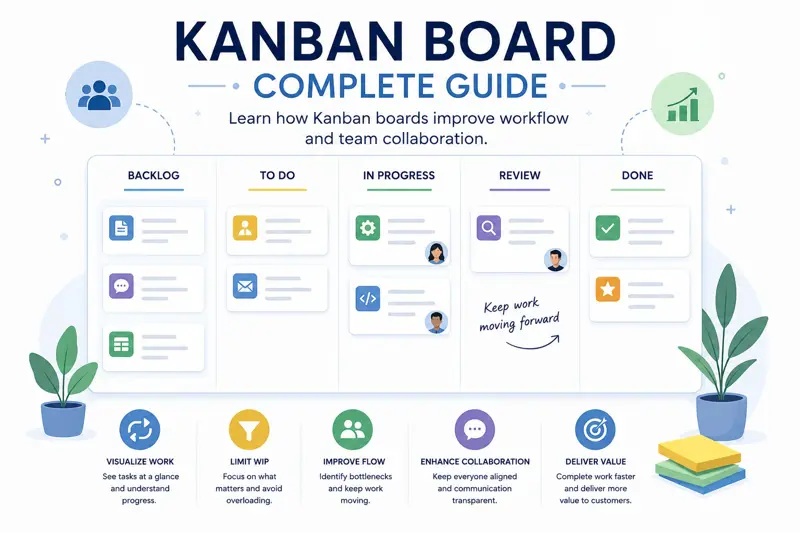
Kanban Board: The Complete Guide to Visual Task Management
Managing dozens or even hundreds of tasks can quickly become overwhelming when work is scattered across spreadsheets, emails, notebooks, and multiple chat applications. Team members lose visibility, managers struggle to understand project status, and important work is often delayed simply because nobody knows what should happen next.
A Kanban board solves this problem by providing a simple visual representation of work. Instead of reading long task lists, everyone can immediately see which tasks are waiting to start, which are currently being worked on, which require review, and which have already been completed.
Originally developed as part of the Toyota Production System, Kanban has grown far beyond manufacturing. Today it is widely used in software development, marketing, construction, finance, healthcare, education, customer support, and many other industries.
Whether you manage personal projects or coordinate hundreds of employees, a Kanban board helps teams improve visibility, reduce bottlenecks, and complete work more efficiently.
This guide explains how Kanban works, why organizations use it, and how you can successfully implement a Kanban workflow in your own business.
What Is a Kanban Board?
A Kanban board is a visual project management tool that organizes work into columns representing different stages of a workflow. Individual tasks are displayed as cards that move from one column to another as work progresses.
Instead of asking for status updates during meetings, managers can simply look at the board and instantly understand where every task stands.
The simplest Kanban board contains three columns:
- To Do
- In Progress
- Done
More advanced boards often include additional workflow stages such as:
- Backlog
- Ready
- Development
- Testing
- Review
- Waiting for Approval
- Completed
The workflow can be customized to match virtually any business process.
How a Kanban Board Works
Every task begins in the first column. As employees complete each stage of work, the task card moves across the board until it reaches the final completed column.
For example, a website redesign project may follow this workflow:
| Stage | Description |
|---|---|
| Backlog | Ideas and future work. |
| Ready | Tasks approved for implementation. |
| Design | User interface creation. |
| Development | Programming work. |
| Testing | Quality assurance. |
| Completed | Finished work. |
This visual workflow allows everyone to understand project status without reading lengthy reports.
Why Teams Use Kanban
One of Kanban's greatest strengths is its simplicity. Team members require very little training before they begin using it effectively.
Organizations that adopt Kanban often experience:
- Improved visibility.
- Better team collaboration.
- Fewer forgotten tasks.
- Faster project delivery.
- Higher productivity.
- Reduced multitasking.
- Greater transparency.
Because everyone sees the same board, communication becomes easier and project status is always visible.
Kanban Cards
Every task on a Kanban board is represented by a card. Rather than containing only a title, modern Kanban cards include detailed information that helps team members complete work efficiently.
A task card typically contains:
- Task title.
- Description.
- Assigned employee.
- Priority level.
- Due date.
- Status.
- Labels or categories.
- Attachments.
- Comments.
- Checklist items.
Keeping all task information inside one card eliminates the need to search through emails or messaging applications.
Limit Work in Progress (WIP)
One of the core principles of Kanban is limiting the amount of work currently being performed.
Many organizations mistakenly believe employees become more productive by working on numerous tasks simultaneously.
In reality, excessive multitasking usually leads to:
- More interruptions.
- Lower quality.
- Longer completion times.
- Higher stress.
- More unfinished work.
Kanban encourages teams to finish existing work before starting new tasks. This improves focus and shortens delivery times.
Identify Workflow Bottlenecks
A Kanban board makes bottlenecks immediately visible.
Imagine that dozens of task cards accumulate in the "Testing" column while other columns remain nearly empty.
This tells managers that testing has become the project's limiting factor. Additional testers may be required, priorities may need adjustment, or the testing process itself may need improvement.
Without a visual workflow, these problems often remain hidden until deadlines are missed.
Prioritize Tasks Clearly
Not every task has the same level of urgency. Kanban allows managers to assign priorities so employees always know which work should be completed first.
Many organizations use labels such as:
- Critical
- High
- Medium
- Low
Some teams also use color-coded labels for departments, customers, or project types, making large boards easier to navigate.
Example Marketing Kanban Board
| Task | Status | Owner |
|---|---|---|
| Create Blog Article | Writing | Emma |
| SEO Review | Review | Michael |
| Create Social Media Graphics | In Progress | Sarah |
| Publish Campaign | Completed | David |
By reviewing the board, marketing managers immediately understand the current status of every campaign without requesting individual progress updates.
If you're planning larger initiatives, continue with our guide Project Management: The Complete Guide .
You may also find Task Management: The Complete Guide to Organizing Work Effectively helpful for creating a structured workflow before visualizing it on a Kanban board.
Kanban vs Scrum
Kanban and Scrum are two of the most popular Agile project management frameworks. While they share the goal of improving collaboration and delivering work efficiently, they approach project management in different ways.
Scrum organizes work into fixed-length iterations called sprints, while Kanban supports a continuous workflow where tasks move across the board whenever they are ready.
| Kanban | Scrum |
|---|---|
| Continuous workflow | Time-boxed sprints |
| No fixed iterations | Usually 1–4 week sprints |
| Flexible priorities | Priorities usually fixed during sprint |
| Focus on workflow | Focus on sprint delivery |
| Continuous releases | Releases often occur after each sprint |
Kanban is often easier to adopt because organizations can improve their existing workflow without introducing entirely new planning processes.
Kanban vs Gantt Charts
Both Kanban boards and Gantt charts help manage projects, but they solve different problems.
A Gantt chart focuses on schedules, timelines, milestones, and task dependencies. A Kanban board focuses on the current flow of work.
| Kanban Board | Gantt Chart |
|---|---|
| Visual workflow | Timeline planning |
| Task movement | Task scheduling |
| Continuous work | Project milestones |
| Flexible priorities | Task dependencies |
| Daily management | Long-term planning |
Many organizations use both tools together. Managers create project schedules using Gantt charts while daily work is managed on a Kanban board.
Personal Kanban
Kanban is not limited to large organizations. Individuals also use Kanban to manage personal responsibilities, study plans, household tasks, or freelance projects.
A simple personal Kanban board may contain:
- Ideas
- To Do
- In Progress
- Waiting
- Completed
This simple visualization helps individuals prioritize work while avoiding overcommitment.
Team Kanban
As organizations grow, multiple employees often collaborate on the same project. Team Kanban boards provide everyone with a shared understanding of the current workload.
Managers can instantly see:
- Who owns each task.
- Current priorities.
- Blocked work.
- Upcoming deadlines.
- Completed activities.
- Overall project progress.
Shared visibility improves accountability while reducing unnecessary meetings.
Use Swimlanes to Organize Work
Large Kanban boards can become difficult to navigate. Swimlanes divide the board horizontally into logical sections.
Organizations commonly create swimlanes based on:
- Projects.
- Departments.
- Customers.
- Priority levels.
- Product releases.
Swimlanes allow teams to organize hundreds of tasks without making the board confusing.
Automate Repetitive Work
Modern Kanban software can automate routine activities that would otherwise consume valuable time.
Examples include:
- Automatically assigning tasks.
- Sending deadline reminders.
- Moving completed tasks.
- Notifying reviewers.
- Updating task status.
- Creating recurring tasks.
Automation reduces manual work while improving workflow consistency.
Measure Workflow Performance
One advantage of digital Kanban boards is the ability to measure workflow performance using objective metrics.
Managers can identify bottlenecks and continuously improve delivery speed.
| Metric | Description |
|---|---|
| Lead Time | Total time from task creation until completion. |
| Cycle Time | Time spent actively working on a task. |
| Throughput | Number of completed tasks within a given period. |
| Work In Progress (WIP) | Tasks currently being worked on. |
| Blocked Tasks | Tasks waiting for external action. |
Monitoring these metrics allows teams to identify trends and continuously improve workflow efficiency.
Real-World Example: Software Development
Imagine a software development team building a customer relationship management (CRM) application.
Instead of maintaining long spreadsheets, every software feature is represented by a Kanban card.
The workflow may include:
- Backlog
- Ready
- Development
- Code Review
- Testing
- Deployment
- Done
Managers immediately know how many features are currently under development, which items are waiting for testing, and whether any bottlenecks are slowing delivery.
Real-World Example: Marketing Team
Marketing departments also benefit from Kanban boards.
A content marketing workflow may include:
- Topic Ideas
- Research
- Writing
- SEO Review
- Design
- Publishing
- Promotion
Instead of asking for progress updates by email, marketing managers simply open the board to view the current status of every campaign.
If you're planning projects with multiple milestones, continue reading Project Planning Step by Step .
You may also find How to Track Project Progress Effectively helpful for monitoring project execution beyond the Kanban workflow.
Kanban Best Practices
Implementing a Kanban board is relatively simple, but using it effectively requires consistency and discipline. Organizations that follow Kanban best practices usually experience smoother workflows, fewer delays, and better team collaboration.
Successful Kanban teams focus on keeping work visible, limiting work in progress, updating task status regularly, and continuously improving their workflow based on real performance data.
The goal is not simply moving cards across a board—it is creating a predictable system where work flows smoothly from start to finish.
Keep the Board Updated
A Kanban board is only useful if it reflects reality.
Employees should update task status immediately after completing work or encountering a blocker.
An outdated board creates confusion because managers make decisions using incorrect information.
Every task should always be located in its correct workflow stage.
Limit Work in Progress
One of Kanban's most important principles is limiting Work In Progress (WIP). Rather than allowing every employee to start ten different tasks, teams should finish existing work before beginning something new.
Typical WIP limits might look like:
| Workflow Stage | Maximum Tasks |
|---|---|
| Development | 5 |
| Testing | 3 |
| Review | 2 |
| Deployment | 2 |
When a column reaches its limit, the team focuses on completing existing work instead of starting additional tasks.
Review the Board Every Day
Many Agile teams begin each working day with a short Kanban review meeting.
Unlike lengthy status meetings, these discussions usually last no more than fifteen minutes.
The team reviews:
- Completed tasks.
- Current priorities.
- Blocked work.
- Upcoming deadlines.
- Resource availability.
- New incoming work.
Regular reviews keep everyone aligned while allowing managers to resolve issues before they become serious delays.
Continuously Improve the Workflow
Kanban encourages continuous improvement rather than waiting until projects are finished.
Managers should regularly analyze workflow metrics and ask questions such as:
- Which stage takes the longest?
- Where do tasks become blocked?
- Can approval steps be simplified?
- Do employees need additional training?
- Should workflow stages be reorganized?
Small improvements implemented consistently often produce significant long-term results.
Common Kanban Mistakes
- Creating too many workflow columns.
- Ignoring Work In Progress limits.
- Leaving completed tasks on the board.
- Failing to assign task owners.
- Not defining priorities.
- Updating the board only before meetings.
- Ignoring blocked tasks.
- Using Kanban without reviewing performance metrics.
Avoiding these common mistakes helps maintain a clean, reliable workflow that everyone can trust.
Kanban Board Checklist
- Create clear workflow stages.
- Define task priorities.
- Assign every task to one owner.
- Set due dates.
- Limit work in progress.
- Review blocked tasks daily.
- Hold short daily board reviews.
- Track lead time.
- Track cycle time.
- Measure throughput.
- Archive completed work.
- Use labels consistently.
- Attach supporting documents.
- Keep task descriptions updated.
- Review workflow monthly.
- Analyze bottlenecks.
- Automate repetitive actions.
- Balance employee workloads.
- Continuously improve the process.
- Keep the board simple and easy to understand.
Frequently Asked Questions
What is a Kanban board?
A Kanban board is a visual workflow management tool that organizes tasks into different stages, allowing teams to monitor progress and improve productivity.
What are the main Kanban columns?
Most boards include To Do, In Progress, Review, and Done, although workflows can be customized for any organization.
What is Work In Progress (WIP)?
Work In Progress represents tasks that are currently being worked on. Limiting WIP helps teams focus and complete work faster.
Can Kanban be used outside software development?
Yes. Kanban is widely used in marketing, HR, finance, healthcare, manufacturing, education, construction, and many other industries.
What is the difference between Kanban and Scrum?
Kanban uses a continuous workflow, while Scrum organizes work into fixed sprints with predefined goals.
Can Kanban and Gantt charts be used together?
Absolutely. Gantt charts are ideal for long-term planning, while Kanban boards are excellent for managing daily execution.
What software supports Kanban boards?
Modern project management software combines Kanban boards with task management, shared calendars, project timelines, dashboards, reporting, document storage, and team collaboration features.
Related Articles
- Project Management: The Complete Guide
- Project Planning Step by Step
- Task Management: The Complete Guide
- How to Track Project Progress Effectively
- How to Reduce Project Delays
- Time Management: The Complete Guide
- Employee Workload Management
- Employee Scheduling: The Complete Guide
Final Thoughts
A Kanban board is far more than a visual task list. It is a practical workflow management system that helps teams organize work, improve collaboration, identify bottlenecks, and deliver projects more efficiently.
By making work visible, limiting work in progress, and measuring performance, organizations create a more predictable and productive working environment. Whether managing software development, marketing campaigns, HR activities, or daily operational tasks, Kanban provides a flexible framework that scales with the needs of the business.
MyPlannerDesk includes a powerful Kanban Board designed for modern teams. Users can create customizable workflows, drag and drop tasks between stages, assign team members, set priorities and deadlines, upload documents, track progress in real time, and collaborate from one centralized workspace. Combined with project planning, calendars, workload management, and reporting, it gives managers complete visibility over every project.
If your organization still relies on spreadsheets or email threads to manage daily work, implementing a Kanban board can significantly improve transparency, team coordination, and project delivery while reducing administrative effort.
Kanban Best Practices
Implementing a Kanban board is relatively simple, but using it effectively requires consistency and discipline. Organizations that follow Kanban best practices usually experience smoother workflows, fewer delays, and better team collaboration.
Successful Kanban teams focus on keeping work visible, limiting work in progress, updating task status regularly, and continuously improving their workflow based on real performance data.
The goal is not simply moving cards across a board—it is creating a predictable system where work flows smoothly from start to finish.
Keep the Board Updated
A Kanban board is only useful if it reflects reality.
Employees should update task status immediately after completing work or encountering a blocker.
An outdated board creates confusion because managers make decisions using incorrect information.
Every task should always be located in its correct workflow stage.
Limit Work in Progress
One of Kanban's most important principles is limiting Work In Progress (WIP). Rather than allowing every employee to start ten different tasks, teams should finish existing work before beginning something new.
Typical WIP limits might look like:
| Workflow Stage | Maximum Tasks |
|---|---|
| Development | 5 |
| Testing | 3 |
| Review | 2 |
| Deployment | 2 |
When a column reaches its limit, the team focuses on completing existing work instead of starting additional tasks.
Review the Board Every Day
Many Agile teams begin each working day with a short Kanban review meeting.
Unlike lengthy status meetings, these discussions usually last no more than fifteen minutes.
The team reviews:
- Completed tasks.
- Current priorities.
- Blocked work.
- Upcoming deadlines.
- Resource availability.
- New incoming work.
Regular reviews keep everyone aligned while allowing managers to resolve issues before they become serious delays.
Continuously Improve the Workflow
Kanban encourages continuous improvement rather than waiting until projects are finished.
Managers should regularly analyze workflow metrics and ask questions such as:
- Which stage takes the longest?
- Where do tasks become blocked?
- Can approval steps be simplified?
- Do employees need additional training?
- Should workflow stages be reorganized?
Small improvements implemented consistently often produce significant long-term results.
Common Kanban Mistakes
- Creating too many workflow columns.
- Ignoring Work In Progress limits.
- Leaving completed tasks on the board.
- Failing to assign task owners.
- Not defining priorities.
- Updating the board only before meetings.
- Ignoring blocked tasks.
- Using Kanban without reviewing performance metrics.
Avoiding these common mistakes helps maintain a clean, reliable workflow that everyone can trust.
Kanban Board Checklist
- Create clear workflow stages.
- Define task priorities.
- Assign every task to one owner.
- Set due dates.
- Limit work in progress.
- Review blocked tasks daily.
- Hold short daily board reviews.
- Track lead time.
- Track cycle time.
- Measure throughput.
- Archive completed work.
- Use labels consistently.
- Attach supporting documents.
- Keep task descriptions updated.
- Review workflow monthly.
- Analyze bottlenecks.
- Automate repetitive actions.
- Balance employee workloads.
- Continuously improve the process.
- Keep the board simple and easy to understand.
Frequently Asked Questions
What is a Kanban board?
A Kanban board is a visual workflow management tool that organizes tasks into different stages, allowing teams to monitor progress and improve productivity.
What are the main Kanban columns?
Most boards include To Do, In Progress, Review, and Done, although workflows can be customized for any organization.
What is Work In Progress (WIP)?
Work In Progress represents tasks that are currently being worked on. Limiting WIP helps teams focus and complete work faster.
Can Kanban be used outside software development?
Yes. Kanban is widely used in marketing, HR, finance, healthcare, manufacturing, education, construction, and many other industries.
What is the difference between Kanban and Scrum?
Kanban uses a continuous workflow, while Scrum organizes work into fixed sprints with predefined goals.
Can Kanban and Gantt charts be used together?
Absolutely. Gantt charts are ideal for long-term planning, while Kanban boards are excellent for managing daily execution.
What software supports Kanban boards?
Modern project management software combines Kanban boards with task management, shared calendars, project timelines, dashboards, reporting, document storage, and team collaboration features.
Related Articles
- Project Management: The Complete Guide
- Project Planning Step by Step
- Task Management: The Complete Guide
- How to Track Project Progress Effectively
- How to Reduce Project Delays
- Time Management: The Complete Guide
- Employee Workload Management
- Employee Scheduling: The Complete Guide
Final Thoughts
A Kanban board is far more than a visual task list. It is a practical workflow management system that helps teams organize work, improve collaboration, identify bottlenecks, and deliver projects more efficiently.
By making work visible, limiting work in progress, and measuring performance, organizations create a more predictable and productive working environment. Whether managing software development, marketing campaigns, HR activities, or daily operational tasks, Kanban provides a flexible framework that scales with the needs of the business.
MyPlannerDesk includes a powerful Kanban Board designed for modern teams. Users can create customizable workflows, drag and drop tasks between stages, assign team members, set priorities and deadlines, upload documents, track progress in real time, and collaborate from one centralized workspace. Combined with project planning, calendars, workload management, and reporting, it gives managers complete visibility over every project.
If your organization still relies on spreadsheets or email threads to manage daily work, implementing a Kanban board can significantly improve transparency, team coordination, and project delivery while reducing administrative effort.