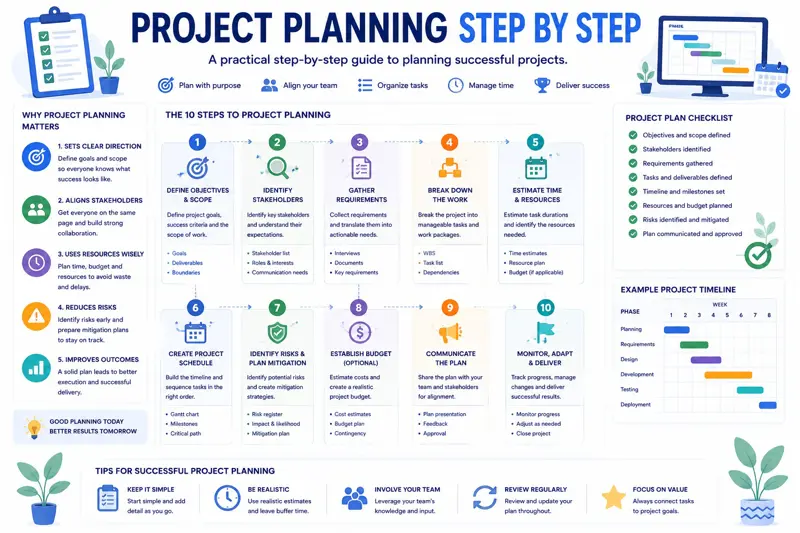
Project Planning Step by Step: A Complete Guide for Successful Teams
Every successful project begins with a solid plan. Whether you're launching a new product, implementing business software, managing a construction project, or organizing an internal company initiative, effective project planning significantly increases your chances of delivering on time and within budget.
Unfortunately, many projects fail long before execution begins. Teams rush into the work without clearly defining objectives, responsibilities, timelines, or available resources. As a result, deadlines slip, budgets increase, priorities change constantly, and employees become overwhelmed.
Project planning helps prevent these problems by providing a structured roadmap that guides the entire team from the initial idea to the successful completion of the project.
In this comprehensive guide, you'll learn how to plan projects step by step, avoid common planning mistakes, estimate timelines accurately, assign work effectively, and monitor progress throughout the entire project lifecycle.
What Is Project Planning?
Project planning is the process of defining how a project will be completed. It includes identifying objectives, estimating resources, assigning responsibilities, creating schedules, managing risks, and establishing methods for tracking progress.
A good project plan answers several important questions before work even begins.
- What needs to be accomplished?
- Why is the project important?
- Who will perform the work?
- When must the project be completed?
- What resources are required?
- What risks could affect delivery?
- How will progress be measured?
Having clear answers to these questions greatly reduces uncertainty and helps teams make better decisions throughout the project.
Why Project Planning Matters
Many organizations believe planning delays execution. In reality, the opposite is true.
Teams that invest sufficient time in planning typically complete projects faster because they encounter fewer unexpected problems during execution.
Proper planning provides several important benefits:
- Clear project objectives.
- Better communication.
- Realistic schedules.
- Improved workload distribution.
- Reduced project risks.
- Better budget control.
- Higher customer satisfaction.
- More predictable project delivery.
Simply put, planning reduces uncertainty while improving team coordination.
Step 1: Define Clear Project Objectives
Every project should begin with a clearly defined objective.
A vague goal such as "Improve the website" gives the team very little direction. Instead, define measurable outcomes that everyone understands.
For example:
| Poor Objective | Better Objective |
|---|---|
| Improve customer support | Reduce average response time from 12 hours to 4 hours by September. |
| Increase sales | Increase monthly online sales by 20% within six months. |
| Build new software | Launch version 1.0 of the customer portal by October 15. |
Specific objectives help every team member understand what success looks like.
Step 2: Identify Project Deliverables
After defining objectives, identify exactly what the project must produce. These outputs are called deliverables.
Deliverables may include:
- Software applications.
- Websites.
- Marketing campaigns.
- Training materials.
- User documentation.
- Infrastructure upgrades.
- Business reports.
Clearly listing deliverables prevents misunderstandings and helps stakeholders agree on project scope before work begins.
Step 3: Break the Project into Smaller Tasks
Large projects can feel overwhelming. Breaking them into smaller, manageable tasks makes planning much easier.
For example, instead of creating one task called "Develop CRM System," divide the work into logical phases:
- Requirements gathering.
- System design.
- Database development.
- Backend implementation.
- User interface development.
- Testing.
- User training.
- Deployment.
This approach improves scheduling accuracy and makes project progress much easier to monitor.
Step 4: Estimate Time and Resources
Once individual tasks have been identified, estimate how much effort each one requires.
Accurate estimation should consider:
- Required working hours.
- Employee availability.
- Technical complexity.
- Dependencies between tasks.
- Potential risks.
- Approval processes.
Avoid assuming that every estimate will be perfect. Experienced project managers usually include contingency time for unexpected issues.
Example Project Breakdown
| Task | Estimated Duration | Responsible |
|---|---|---|
| Requirements Analysis | 5 Days | Business Analyst |
| System Design | 4 Days | Solution Architect |
| Development | 20 Days | Development Team |
| Testing | 7 Days | QA Team |
| Deployment | 2 Days | Project Team |
Breaking projects into smaller activities also makes it easier to monitor progress and identify delays before they affect the overall delivery date.
Step 5: Identify Project Risks Early
Every project involves uncertainty. Identifying risks before work begins allows the team to prepare mitigation strategies instead of reacting after problems occur.
Common project risks include:
- Changing customer requirements.
- Unavailable team members.
- Technology failures.
- Supplier delays.
- Budget limitations.
- Scope changes.
- Regulatory requirements.
Create a simple risk register listing each risk, its probability, potential impact, and planned response. Reviewing this document regularly helps project managers make faster and more informed decisions.
Effective planning also depends on assigning the right priorities. Before starting execution, read our guide How to Prioritize Tasks Effectively Using the Eisenhower Matrix , which explains how to focus on work that delivers the greatest business value.
You'll also benefit from our article Employee Workload Management: How to Prevent Burnout and Improve Productivity , which explains how balanced workloads improve project success and reduce missed deadlines.
Step 6: Assign Roles and Responsibilities
Even the best project plan will fail if team members are unsure who is responsible for completing each task. Clearly defined responsibilities improve accountability, reduce confusion, and help projects move forward without unnecessary delays.
Every project should identify:
- Project manager.
- Project sponsor.
- Technical leads.
- Team members.
- External stakeholders.
- Customers or end users.
Each participant should understand both their own responsibilities and how their work affects the rest of the project.
Create a Responsibility Matrix
One useful technique is the RACI matrix. It defines who is:
- Responsible – Performs the work.
- Accountable – Owns the final result.
- Consulted – Provides expertise.
- Informed – Receives project updates.
For example:
| Task | Project Manager | Developer | QA | Customer |
|---|---|---|---|---|
| Requirements | A | C | I | R |
| Development | I | R | C | I |
| Testing | I | C | R | I |
| Deployment | A | R | R | I |
Using a responsibility matrix minimizes misunderstandings and ensures everyone knows their role before execution begins.
Step 7: Build a Realistic Project Schedule
A project schedule transforms individual tasks into a structured timeline. Rather than simply listing activities, it identifies the order in which work must be completed.
A good schedule includes:
- Task start dates.
- Task finish dates.
- Dependencies.
- Milestones.
- Resource assignments.
- Review points.
Avoid scheduling every employee at 100% capacity. Unexpected issues are almost certain to occur during long projects.
Understand Task Dependencies
Many project activities cannot begin until previous work has been completed. These relationships are known as task dependencies.
For example:
| Task | Depends On |
|---|---|
| Database Design | Requirements Analysis |
| Backend Development | Database Design |
| Frontend Development | UI Design |
| System Testing | Development Complete |
| Deployment | Testing Complete |
Mapping dependencies early helps identify the critical sequence of work and prevents unrealistic schedules.
Step 8: Define Project Milestones
Milestones are significant events that indicate important achievements during the project.
Unlike normal tasks, milestones usually have no duration. Instead, they mark the completion of major phases.
Examples include:
- Requirements approved.
- Design completed.
- Development finished.
- User acceptance testing completed.
- Project go-live.
Milestones help managers communicate progress to stakeholders without reviewing every individual task.
Develop a Communication Plan
Poor communication is one of the leading causes of project failure. Even technically successful projects can struggle when stakeholders receive inconsistent or incomplete information.
A communication plan should answer:
- Who receives updates?
- How often are meetings held?
- Which reports are required?
- How are risks communicated?
- Who approves major decisions?
Establishing communication expectations early prevents confusion later in the project.
Example Timeline for a Software Project
| Week | Main Activity |
|---|---|
| 1 | Requirements Analysis |
| 2 | System Design |
| 3–6 | Development |
| 7 | Testing |
| 8 | Deployment |
Although every project differs, visual timelines make it much easier for team members and stakeholders to understand the overall project schedule.
Monitor Progress Continuously
Project planning does not end when execution begins.
Successful project managers compare planned progress with actual progress throughout the project lifecycle.
Useful questions include:
- Are tasks being completed on time?
- Are any milestones delayed?
- Has the project scope changed?
- Are additional resources required?
- Have new risks appeared?
Frequent progress reviews help identify small issues before they become major project delays.
Common Project Planning Mistakes
- Starting work before defining objectives.
- Underestimating task durations.
- Ignoring dependencies.
- Assigning too much work to key employees.
- Failing to identify risks.
- Poor communication.
- Not reviewing project progress regularly.
- Making frequent scope changes without updating the plan.
Most project failures result from planning weaknesses rather than execution problems. Investing additional time in planning often saves weeks of corrective work later.
If your projects frequently experience deadline issues, continue with our guide How to Reduce Project Delays, which explains practical techniques for identifying risks early and keeping projects on schedule.
Choose the Right Project Management Methodology
Every project is different. Choosing the right planning methodology helps teams work more efficiently and reduces unnecessary complexity.
The three most common approaches are Waterfall, Agile, and Hybrid project management.
| Methodology | Best For | Main Advantage |
|---|---|---|
| Waterfall | Construction, Manufacturing | Clear sequential phases |
| Agile | Software Development | Fast adaptation to change |
| Hybrid | Business Projects | Combines planning with flexibility |
Selecting the right methodology depends on project complexity, customer requirements, available resources, and how frequently project requirements are expected to change.
Use Gantt Charts for Timeline Planning
A Gantt chart is one of the most effective tools for visualizing a project schedule. It displays tasks on a timeline, making it easy to understand when work starts, when it finishes, and how activities depend on one another.
Project managers use Gantt charts to:
- Plan schedules.
- Monitor progress.
- Track milestones.
- Identify delays.
- Manage dependencies.
For projects with many interconnected tasks, Gantt charts provide a much clearer overview than simple task lists.
Use Kanban Boards for Daily Work
While Gantt charts focus on schedules, Kanban boards help teams manage daily execution.
Tasks move through stages such as:
- To Do
- In Progress
- Review
- Completed
Kanban makes current work visible to the entire team and helps managers quickly identify bottlenecks.
Many organizations successfully combine Gantt charts for long-term planning with Kanban boards for daily execution.
Monitor Your Critical Path
Some tasks directly determine the project's completion date. Together they form the Critical Path.
If any task on the critical path is delayed, the entire project is delayed unless corrective action is taken.
Project managers should regularly review:
- Critical activities.
- Task dependencies.
- Available resources.
- Project milestones.
- Potential delays.
Understanding the critical path allows managers to focus attention where it has the greatest impact.
Plan Your Budget Alongside Your Schedule
Time is only one part of successful planning. Every project also requires a realistic financial plan.
Budget planning should include:
- Employee costs.
- Software licenses.
- Equipment purchases.
- External consultants.
- Travel expenses.
- Training costs.
- Contingency reserves.
Tracking project costs throughout execution helps prevent unpleasant financial surprises.
Review the Project Plan Regularly
A project plan should never remain static.
As projects evolve, managers should review schedules, priorities, risks, and resource allocations on a regular basis.
Weekly planning meetings often include:
- Progress review.
- Completed milestones.
- Upcoming deadlines.
- New project risks.
- Customer feedback.
- Updated priorities.
Continuous planning enables teams to adapt quickly while maintaining overall project control.
Project Planning Checklist
Before starting execution, confirm that each of the following has been completed:
- Project objectives clearly defined.
- Deliverables documented.
- Project scope approved.
- Work Breakdown Structure completed.
- Responsibilities assigned.
- Timeline created.
- Dependencies identified.
- Milestones established.
- Resources allocated.
- Budget approved.
- Risks documented.
- Communication plan prepared.
- Success metrics defined.
- Stakeholders informed.
- Priority tasks identified.
- Employee availability confirmed.
- Vacation schedules reviewed.
- Reporting process established.
- Project kickoff meeting completed.
- Planning documentation shared with the team.
Related Articles
Continue improving your project management skills with these practical guides:
- How to Track Project Progress Effectively
- How to Reduce Project Delays
- How to Prioritize Tasks Effectively Using the Eisenhower Matrix
- Employee Workload Management
- Kanban vs Gantt – When Should You Use Each?
- Planner vs Excel – Which Is Better?
Frequently Asked Questions
What is project planning?
Project planning is the process of defining objectives, tasks, timelines, resources, budgets, risks, and responsibilities before project execution begins.
Why is project planning important?
Planning improves communication, reduces project risks, helps control costs, and significantly increases the likelihood of completing projects on time.
What should every project plan include?
Every project plan should include objectives, deliverables, schedules, resources, budgets, risks, milestones, and communication procedures.
How detailed should a project plan be?
It should be detailed enough for every team member to understand what needs to be done, who is responsible, and when work should be completed.
What is the Critical Path?
The Critical Path is the sequence of activities that determines the shortest possible project duration. Delays on these tasks usually delay the entire project.
How often should project plans be updated?
Project plans should be reviewed weekly and updated whenever priorities, resources, timelines, or customer requirements change.
Should small businesses use formal project planning?
Yes. Even small projects benefit from structured planning because it improves organization, communication, and accountability.
What software helps with project planning?
Modern project management software combines task management, calendars, resource planning, workload balancing, reporting, dashboards, and collaboration tools in one centralized platform.
Final Thoughts
Successful projects rarely happen by accident. They are the result of careful planning, realistic scheduling, effective communication, and continuous monitoring throughout the project lifecycle.
By defining clear objectives, breaking work into manageable tasks, assigning responsibilities, identifying risks, and reviewing progress regularly, organizations significantly improve their chances of delivering projects on time, within budget, and to the expected quality standards.
MyPlannerDesk is designed to simplify every stage of project planning. From task management and project timelines to employee scheduling, workload balancing, progress tracking, calendars, and reporting, everything is available in one centralized workspace. Managers gain complete visibility into their projects, while team members always know what to do, when to do it, and what priorities come next.
Whether you manage a small team or a growing organization, investing time in better project planning today will lead to more predictable deliveries, happier employees, and more successful projects tomorrow.