Kanban vs Gantt: Which Project Management Method Should You Use?
Choosing the right project management method can significantly influence how efficiently your team plans work, collaborates, and delivers projects. Among the most widely used approaches are Kanban boards and Gantt charts. Both are powerful planning tools, yet they solve different problems and support different ways of working.
Some organizations rely almost entirely on Kanban boards because they need continuous workflow management, rapid task updates, and flexible priorities. Others prefer Gantt charts because they provide a structured project timeline, task dependencies, milestones, and long-term scheduling.
Neither approach is universally better. The best choice depends on the type of projects you manage, the size of your team, the complexity of your schedules, and how much visibility you need into future work.
Many modern organizations actually use both. A project manager may plan the overall schedule with a Gantt chart while individual team members organize their daily work using Kanban boards. Rather than competing methodologies, they often complement each other.
This guide compares Kanban and Gantt charts in detail, explaining how each works, where each excels, their advantages and limitations, and how to decide which approach best fits your projects.
Understanding Kanban
Kanban is a visual workflow management method that helps teams organize, prioritize, and track work as it moves through different stages of completion. Instead of focusing primarily on project timelines, Kanban focuses on the flow of work.
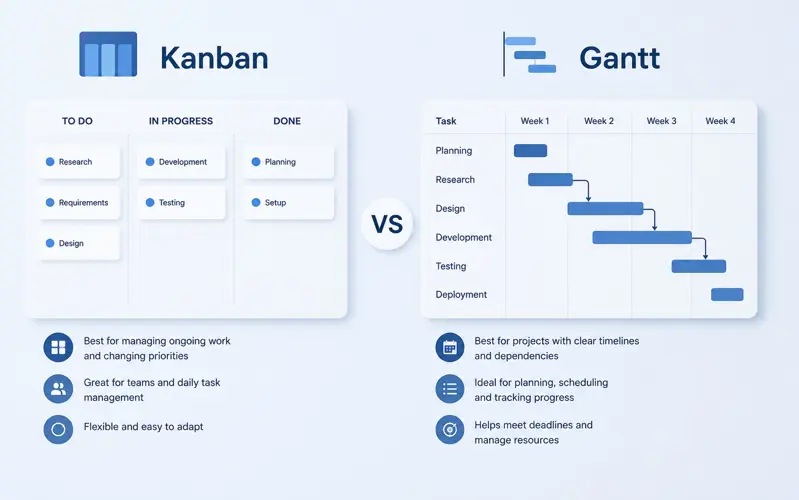
A typical Kanban board is divided into columns representing different workflow stages such as To Do, In Progress, Review, and Completed. Individual tasks are displayed as cards that move from one column to the next as work progresses.
This simple visual structure makes it easy for everyone on the team to understand the current status of work without reading lengthy reports or spreadsheets.
Kanban originated in manufacturing but has become one of the most popular workflow management methods for software development, marketing, customer support, HR, operations, and many other industries.
Understanding Gantt Charts
A Gantt chart is a timeline-based project planning tool that displays tasks, their durations, start and finish dates, dependencies, milestones, and overall project progress.
Unlike Kanban, which focuses on the movement of work through workflow stages, Gantt charts emphasize scheduling and coordination over time.
Every task appears as a horizontal bar positioned according to its planned start and finish dates. Longer tasks produce longer bars, while dependencies show which activities must be completed before others can begin.
This provides project managers with a comprehensive overview of the entire project schedule, making it easier to identify potential delays, resource conflicts, and upcoming milestones.
The Different Philosophy Behind Each Method
Although both Kanban and Gantt charts help manage projects, they approach work from completely different perspectives.
Kanban asks a simple question:
"What should the team work on right now?"
Gantt charts answer a different question:
"When should every activity happen to finish the entire project on time?"
This difference explains why organizations often benefit from using both methods together rather than choosing only one.
How Work Is Organized
| Area | Kanban | Gantt Chart |
|---|---|---|
| Primary Focus | Workflow | Schedule |
| View | Board | Timeline |
| Planning Horizon | Current Work | Entire Project |
| Dependencies | Usually Minimal | Fully Supported |
| Milestones | Limited | Built In |
| Timeline | No | Yes |
| Continuous Work | Excellent | Moderate |
Advantages of Kanban
Kanban's greatest strength is simplicity. Employees can understand their work within seconds simply by looking at the board.
Key advantages include:
- Easy to learn.
- Excellent task visibility.
- Supports continuous work.
- Highly flexible.
- Simple prioritization.
- Quick status updates.
- Encourages team collaboration.
- Reduces work in progress.
Because tasks move visually across the board, bottlenecks become immediately visible, allowing managers to intervene before delays become serious.
Advantages of Gantt Charts
Gantt charts excel when projects involve detailed schedules, multiple dependencies, fixed deadlines, and careful coordination between teams.
Major advantages include:
- Complete project timeline.
- Task dependencies.
- Milestone tracking.
- Long-term planning.
- Critical path visibility.
- Resource coordination.
- Schedule forecasting.
- Progress monitoring.
Project managers gain a complete overview of every activity, making it easier to predict scheduling conflicts before they occur.
Example: Software Development Team
Imagine a software company developing a new mobile application. Developers receive new tasks every week, bugs are discovered continuously, and priorities change frequently based on customer feedback.
For daily work, Kanban is extremely effective. Developers simply move tasks from To Do to In Progress, Code Review, Testing, and finally Done. Everyone immediately understands the current workload and which tasks require attention.
However, senior project managers still need a long-term roadmap showing release dates, sprint milestones, integration deadlines, and customer deliveries. That information is much easier to manage with a Gantt chart.
Many successful software companies therefore combine both approaches instead of choosing only one.
If you're new to visual task management, read our Kanban Board: The Complete Guide.
To understand project scheduling in greater detail, continue with Gantt Chart: The Complete Guide.
You may also find Project Management: The Complete Guide helpful for understanding how both methods fit into the overall project lifecycle.
Planning Flexibility
One of the biggest differences between Kanban and Gantt charts is how they handle change. Every project evolves over time, but not every project changes at the same pace. Understanding how each method adapts to changing priorities helps organizations choose the most appropriate planning approach.
Kanban is designed for flexibility. New tasks can be added at any time, task priorities can change within seconds, and work can be reorganized without affecting the entire board. This makes Kanban ideal for environments where customer requests, bug reports, support tickets, or marketing activities change daily.
Gantt charts, on the other hand, emphasize structured planning. While modern software makes updating schedules much easier than in the past, changes often affect multiple tasks because activities are connected through dependencies. Moving one deadline may require adjusting several related tasks to preserve a realistic project schedule.
Neither approach is wrong. Stable, predictable projects benefit from detailed planning, while rapidly changing projects benefit from flexibility.
Managing Deadlines
Deadlines are central to almost every project. Construction projects have completion dates, software companies promise release schedules, marketing teams work toward campaign launches, and consulting firms commit to customer delivery dates.
Gantt charts are specifically designed to help managers monitor these deadlines. Every task is positioned on a timeline, making it easy to understand whether the project remains on schedule.
Managers can immediately answer questions such as:
- Which tasks are overdue?
- Which milestone is approaching?
- How will today's delay affect next month's delivery?
- Which activities must be completed before others begin?
Kanban boards show whether work is progressing, but they provide much less visibility into the overall project schedule.
Handling Task Dependencies
Many projects contain activities that cannot begin until previous work has been completed.
For example:
- A building cannot be painted before construction is complete.
- Software testing cannot begin before development finishes.
- Marketing campaigns cannot launch before creative assets are approved.
- Employee training cannot start until new hires have completed onboarding.
These relationships are called task dependencies, and they are one of the greatest strengths of Gantt charts.
When one activity changes, dependent tasks can automatically shift to maintain a realistic schedule.
Kanban boards generally treat tasks as independent workflow items. Although some software platforms allow linked tasks, dependency management is not the primary purpose of Kanban.
Daily Team Collaboration
Kanban was designed around team collaboration. Every member of the team can immediately see what colleagues are working on, which tasks are waiting for review, and where bottlenecks are developing.
Daily stand-up meetings become much more productive because the board itself provides most of the information required for discussion.
Questions such as:
- What are you working on today?
- What is blocking progress?
- Which tasks need review?
- Who needs assistance?
can often be answered simply by looking at the board.
Gantt charts support collaboration as well, but they are typically used by project managers for planning rather than by every employee throughout the day.
Resource Management
Projects rarely compete only for time—they also compete for people, equipment, budgets, and other resources.
Gantt charts make resource planning easier because managers can see when employees are scheduled to work on multiple activities simultaneously.
For example, if one engineer is assigned to three projects beginning on the same day, a Gantt chart immediately reveals the conflict.
Kanban boards display assigned tasks clearly, but they do not naturally provide a long-term overview of future resource utilization.
Managing Work in Progress
One of Kanban's most valuable concepts is limiting work in progress (WIP). Instead of encouraging employees to begin as many tasks as possible, Kanban encourages teams to finish existing work before starting new activities.
This simple principle produces several important benefits:
- Higher quality work.
- Fewer unfinished tasks.
- Better focus.
- Reduced multitasking.
- Faster delivery.
- Improved workflow stability.
Gantt charts do not specifically address work-in-progress limits because their primary objective is schedule management rather than workflow optimization.
Project Visibility for Managers
Executives and project managers often need a broader perspective than individual contributors.
A Gantt chart provides an executive-level overview showing the entire project timeline, milestones, dependencies, and expected completion dates. This makes it easier to communicate project status to customers, stakeholders, and senior management.
Kanban boards provide excellent operational visibility but focus primarily on current work rather than long-term planning.
Example: Construction Project
Consider the construction of a new office building.
The project begins with site preparation, followed by foundations, structural work, electrical installation, plumbing, roofing, interior finishing, painting, equipment installation, inspections, and final handover.
Every stage depends on the successful completion of previous work. Delaying one contractor often affects the schedules of several others.
A Gantt chart is ideal because it clearly displays every dependency, milestone, and deadline while allowing managers to forecast the impact of delays.
A Kanban board may still be useful for individual subcontractors managing their daily work, but it cannot replace the overall project schedule.
Example: Marketing Agency
Now consider a marketing agency producing content for dozens of clients. Design requests arrive throughout the day, copywriters receive new assignments, SEO specialists update existing campaigns, and account managers respond to customer feedback.
Priorities change constantly.
Kanban works exceptionally well because new work can be added immediately, employees can reprioritize tasks without rebuilding schedules, and managers always know what each team member is currently handling.
Large campaign launches can still benefit from a Gantt chart, but daily work is typically easier to manage using Kanban.
Can You Use Both Together?
Absolutely. In fact, many organizations achieve the best results by combining both methods instead of treating them as alternatives.
A common approach is to use a Gantt chart for long-term project planning while using Kanban boards for day-to-day task execution.
Project managers define milestones, deadlines, and dependencies in the Gantt chart. Individual teams then organize their daily activities using Kanban boards, updating progress as work moves through each stage.
This combination provides both strategic visibility and operational flexibility.
To learn more about planning complex schedules, read Project Planning Step by Step.
If your projects involve balancing people across multiple initiatives, continue with Resource Management: The Complete Guide.
You may also find Workload Management: The Complete Guide helpful for distributing work evenly across your team while avoiding overload and scheduling conflicts.
Kanban vs Gantt: Side-by-Side Comparison
Although both Kanban boards and Gantt charts help teams organize work, they are designed with different objectives in mind. Comparing their capabilities across key project management areas makes it easier to determine which approach best fits your organization's needs.
| Feature | Kanban | Gantt Chart |
|---|---|---|
| Primary Purpose | Manage workflow | Manage project schedule |
| Visual Layout | Board with columns | Timeline |
| Task Prioritization | Excellent | Good |
| Daily Team Work | Excellent | Good |
| Long-Term Planning | Limited | Excellent |
| Task Dependencies | Basic | Excellent |
| Milestones | Limited | Built In |
| Deadline Management | Good | Excellent |
| Changing Priorities | Excellent | Moderate |
| Resource Planning | Limited | Excellent |
| Executive Reporting | Good | Excellent |
| Learning Curve | Very Easy | Moderate |
When Should You Choose Kanban?
Kanban is an excellent choice when work is continuous rather than organized into large projects with fixed completion dates.
Choose Kanban if your team:
- Receives new work every day.
- Needs maximum flexibility.
- Frequently changes priorities.
- Handles customer requests continuously.
- Works with support tickets or service requests.
- Benefits from visual workflow management.
- Wants to reduce work in progress.
- Needs a simple system that everyone can understand quickly.
Typical examples include customer support departments, IT help desks, software maintenance teams, content marketing agencies, HR departments, and operational teams that manage ongoing business activities.
When Should You Choose a Gantt Chart?
A Gantt chart is usually the better choice when projects involve clear deadlines, detailed schedules, and many dependent activities.
Choose a Gantt chart if your projects include:
- Fixed delivery dates.
- Complex project schedules.
- Multiple project phases.
- Task dependencies.
- Project milestones.
- Resource coordination.
- Budget planning.
- Long-term forecasting.
Construction companies, engineering firms, consulting businesses, product development teams, and organizations delivering customer projects often rely on Gantt charts because scheduling accuracy is essential.
When Is It Best to Use Both?
For many organizations, choosing between Kanban and Gantt is the wrong question. The most productive teams combine both methods because they solve different planning challenges.
A practical workflow might look like this:
- Create the overall project schedule using a Gantt chart.
- Define milestones and project deadlines.
- Assign resources across the project timeline.
- Break milestones into smaller tasks.
- Manage daily execution using a Kanban board.
- Update project progress automatically as tasks move across the board.
This approach gives project managers strategic control while allowing team members to organize their daily work using a simple visual workflow.
Common Mistakes When Using Kanban
Although Kanban is intentionally simple, teams sometimes reduce its effectiveness by adopting poor habits.
- Allowing too many tasks in progress.
- Ignoring blocked work.
- Never reviewing completed tasks.
- Using unclear task descriptions.
- Failing to prioritize the backlog.
- Leaving tasks assigned to the wrong employees.
- Creating too many workflow columns.
- Not reviewing the board during team meetings.
Keeping the workflow simple and regularly reviewing the board helps teams gain the maximum benefit from Kanban.
Common Mistakes When Using Gantt Charts
Gantt charts also require regular maintenance. Without updates, even the best project schedule quickly becomes inaccurate.
Common mistakes include:
- Creating unrealistic timelines.
- Ignoring task dependencies.
- Failing to update completed work.
- Planning every detail months in advance.
- Overlooking resource availability.
- Not monitoring critical milestones.
- Ignoring schedule changes.
- Treating the Gantt chart as a static document.
A Gantt chart should evolve throughout the project as new information becomes available.
Frequently Asked Questions
Which is easier to learn?
Kanban is generally easier because employees simply move task cards through workflow stages. Most teams become comfortable with Kanban after only a short introduction.
Which method is better for Agile teams?
Many Agile teams prefer Kanban because it supports continuous delivery and rapidly changing priorities. However, Agile organizations often combine Kanban with Gantt-style roadmaps for long-term planning.
Can Gantt charts support Agile projects?
Yes. While Gantt charts are commonly associated with traditional project management, many Agile organizations use them to communicate release schedules, major milestones, and project roadmaps.
Which method is better for construction projects?
Construction projects almost always benefit from Gantt charts because they depend heavily on scheduling, milestones, contractor coordination, and task dependencies.
Can small businesses use Kanban?
Absolutely. Kanban is one of the easiest project management methods for small businesses because it requires very little setup while providing immediate visibility into daily work.
Do I have to choose only one?
No. Many successful organizations combine Gantt charts for project planning with Kanban boards for daily task management, gaining the strengths of both approaches.
Related Articles
- Project Management: The Complete Guide
- Gantt Chart: The Complete Guide
- Kanban Board: The Complete Guide
- Project Planning Step by Step
- Task Management: The Complete Guide
- Resource Management: The Complete Guide
- Workload Management: The Complete Guide
- How to Track Project Progress Effectively
- How to Reduce Project Delays
- Planner vs Excel: Which Is Better?
Final Thoughts
Kanban boards and Gantt charts are not competing project management methods as much as they are complementary planning tools. Kanban excels at organizing daily work, improving team collaboration, and managing continuous workflows. Gantt charts provide the long-term visibility needed to coordinate complex projects, manage dependencies, allocate resources, and monitor milestones.
The best choice depends on how your organization works. Teams with constantly changing priorities often achieve better results with Kanban, while projects with fixed deadlines and structured schedules benefit from Gantt charts. Organizations managing multiple projects frequently combine both approaches, using Gantt charts for strategic planning and Kanban boards for day-to-day execution.
MyPlannerDesk brings both methods together in one integrated platform. Project managers can build detailed Gantt schedules with milestones, dependencies, and resource planning, while employees organize daily work using interactive Kanban boards. Combined with Task Management, Time Tracking, Employee Scheduling, Workload Management, Shared Calendars, Dashboards, and Reporting, MyPlannerDesk provides everything needed to plan, execute, and monitor projects from a single workspace.
Whether your organization manages software development, construction projects, marketing campaigns, consulting services, or internal business operations, using the right combination of Kanban and Gantt can improve collaboration, increase visibility, and help your team deliver successful projects more consistently.